
Mark Alington
-
Posts
16 -
Joined
-
Last visited
-
Days Won
1
Everything posted by Mark Alington
-
I still plot some of my shows on our FLXS24 treating the RGBW pars as 4 discrete channels. I know this is not the normal method, but it works for me. It enables me to add a little of one state or of a colour from one lamp or more at the speed that I want, and then fade it out again leaving everything as it was; I can add a colour chase or a highlight "sparkle" chase for a few seconds or for one complete item, fading it in over the top of the base state at the time, and fade it back out.
-
Thanks DALX. I'm fine with getting different colors in each cell/pixel/whatever, but I want them to change one at a time in sequence like this demo Pixel chase.m4v
-
I have some battens forming the ground row for lighting a conference set. Normally I'll have a number of static states which I can cross-fade between (leaving the presenters' lighting on seperate control on the first 12 channels). What I want to do is to create a wipe across the set to change colour state; the Colorado144 battens conveniently provide a total of 36 cells across the stage. I've done this by creating a palette for each look and recording each step advancing each cell as individual steps either as a chase or as a series of follow-on cues with step times of 0.2secs, and the look (on the workshop bench) is exactly what I'm after. However this will get a bit tedious plotting every wipe. I am wondering whether Multicell might help? I have tried 2 different methods to get the same result - (A) Assign each cell as a different RGBWA fixture (e.g. 13 - 48), or (B) Assign each fitting with attributes (e.g. 13.1 - 24.3). Recording a wipe on our FLXS, after setting everything up including the colour palette, (A) requires 4 button presses per step, (B) requires 10. The question is whether there is an easier way of creating this "wipe". This has also made me wonder if there is a way of adding default Trigger and Wait Times for recording sequences like these. Using either method, when I run this wipe sequence, the desk instantly sets all the pixels to a fixed colour. If the wipes are run in a pre-programmed order, this is not an issue as the last colour from the previous sequence is used. However, if I want to run the sequences in a random order to match the mood, this jump to another base colour becomes apparent. Once recorded using either method, it can be played back either as a chase (using just 1 cycle) or as a sequence of auto-follow-on cues. I remembering the days of running shows on a Strand Century Palette 30-ish years ago, any chase could be assigned an attribute of (i) forward/back, (ii) bounce on/off, (iii) random on/off, (iv) build on/off, and (v) invert on/off. I've almost certainly got some detail wrong! These could be added to any effect, even on-the-fly. Any chance of something like this on the FLX? Sorry, this is a lot of questions for a very small desk!
-
I often use our FLXS24 for concerts with our brass band. The venue has 12 LED pars and 4 moving lights which I tap into. I bring a selection of other lights for each show; these could be any type of light. The majority of the show depends on preparing the PARs into different zones/angles. I'll then pair up duplicated zones/colours (eg Downstage red; downstage green etc); this gives me 20 basic channels. Being very old-fashioned I record one colour per channel telling the desk these are conventional dimmers. I'll then make up the show one scene at a time, mixing the colours and areas to suit. I'll record playbacks with 'go-to' states (eg Preset, Full Up Finish, etc). I'll then record the complete show onto the main fader in sequence. This enables me to mix evenly from one random state to another at whatever speed is needed at the time as live shows always go off-script at some point. I'll then do some sequences or preset positions with the moving lights, and either play these back in manually on top of the prerecorded cues or play them back as chases on playbacks. Theis gives me the advantage of being able to fade at whatever speed I want for each main change, to add or boost particular channels as required without affecting the base colour state. I will have a maximum of two hrs to set up from arriving at the venue till doors opening, check all the venue's lights focus and check all the states I have prerecorded, On top of all this, I also play in the band, with the desk sat next to me. Love it!
-
As Edward says, save the show files to a stubby USB stick. This can then be removed and copied to your main computer as an off-line backup as often as you want. I also put the instruction manuals etc on this stick so that they are always with me on site - just in case!
-
Thanks for taking so long to talk through these issues which we eventually resolved. The issue turned out to be that all the DMX sources we had selected only used a low number of DMX channels, so the transmission packet only covered these circuits (eg 18 channels) before re-starting; the transmission did not include the remaining channels to total 512. The FLX-S could not see a full DMX chain of 512 channels so did not open the shorter data chain. The tests we did using the FLX itself and our Infinity desk as alternative sources showed the FLX could read DMX in, which we initially thought was attributable to an earthing issue. I have now tried recording a state from our Zip 12 into our Swisson and playing this back into the FLX which works. I'd still like to be able to use a smaller desk as an input which would open up the possibilities of running sound-to-light on the FLX
-
Thanks Edward - done.
-
Yes - all the cables are correct - I've used a 2nd set too, also tested. Also 2nd lighting desk to provide input and various lamps etc to test output, but still nothing on the Z -DMX input screen either. Lost count on how many times I've rebooted. FAV test B Sept2023.zos
-
Ah yes - I'd been temporarily checking that signal was still flowing through the ports even if in the wrong direction. I've redone the file, but this now takes it above the limit of file size I can send you
-
I am using Port 2 (3-pin) for the input which will make plugging up for the coming show easier. Everything you say is what I am expecting, but still nothing happening. I've rebooted twice. Running v 7.14. Still no joy 😞 FAV test Sept2023.zos
-
Hi - I have followed all the guidance on the manual pages https://www.zero88.com/manuals/zeros/setup/triggers/dmx-in-2 I am still not getting any readings on DMX input even though all the options on the desk match all in the instructions. I know earlier software versions did not allow DMX in for FLX S24, but I was really looking forward to using this. Should I be getting a signal?
-
Thanks for your help Edward - everything is doing what I want. I have yet to see what it actually looks like! I have noticed various helpful pages with hints/videos/forums etc, but there could be a better way of getting from one to the other than going back to Google 🙂
-
Hello again! I am using playback #1 to run a number of cues, each of which is a macro to call other playbacks (37 - 42), each of which has a chase programmed; it also releases the previous chase. Mostly it is working fine, but the chases are cross-fading from one to the next over about 2 - 3 secs rather than changing as a snap. I'll want to run through these quickly (less than 3secs per Go). Another fader #2 is programmed to release all the above chases, which it does instantly. (it is these different chase patterns which I want to be able to change the colours over as per my previous query). Outdoor cinema stage 1.isf
-
Intensity Chase whilst adding Colours over the top
Mark Alington replied to Mark Alington's topic in FLX S24 & FLX S48
Thanks Edward. I've got all this working. I spent a lot of the time untagling my channels from the playbacks on the different pages! I'll post another query elsewhere unless I can find it already answered. -
Intensity Chase whilst adding Colours over the top
Mark Alington posted a topic in FLX S24 & FLX S48
I want to record a chase of a number of units. Then independantly I want to control the colour of all these units, possibly from a variety of plabacks. -
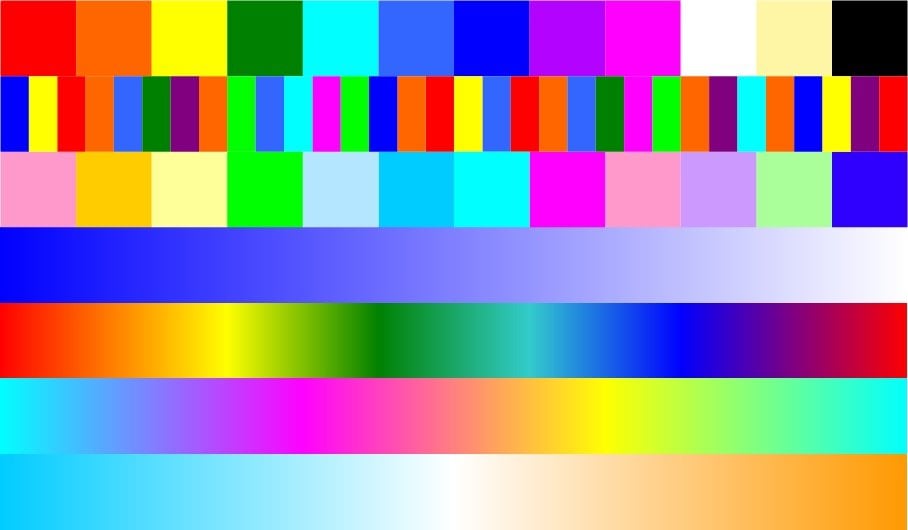
This is an image I have created to load into our desk and which I use virtually exclusively for selecting colours for fittings. The first row is a basic selection of bright colours; row 2 has a mix of colours (great for creating "random" colours); row 3 has pastels; row 4 is a fade from dark blue to white; row 5 is a traditional rainbow; row 6 is a rainbow of secondary colours; the last row is a variation of colour temperatures (great for blending with other light fittings). I created this using Visio. Please feel free to use and share.