Leaderboard
Popular Content
Showing content with the highest reputation on 12/20/2025 in Posts
-
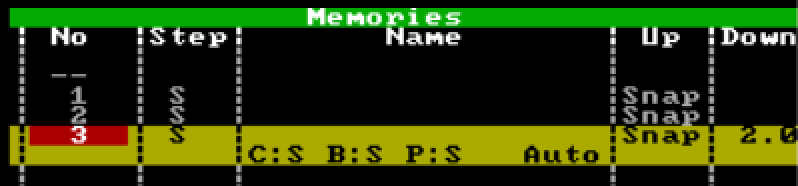
Hi @barefootcoder, I'm assuming you're working on a Jester 24/48, or a 12/24? Unfortunately, this isn't possible on those consoles due to the trigger functionality not being present. You'll simply have to press the GO button twice quickly. However, the answer is different if you are on a console that's on the ML side of things (Jester ML, ML24, ML48). If you are on a Jester ML console, you can do the following: 1. Go to the cue that you'd like to then program addition cues to snap down and fade down. 2. Bring the fixture you'd like to snap down to an intensity of 0. 3. Ensure 'Down' is 'Snap'. Then hit Program to store that cue, after selecting which memory to record to. 4. Now bring the other fixtures down to an intensity of 0. 5. Define a 'Down' fade time. 6. Use the 'Special' tab on the front panel to tap 'Trigger'. This will change it to 'Auto', which will be an instant follow-on from the previous cue. You can then hit program again. In Run mode, after hitting the GO button on the snap-down cue, the fade-all down cue will automatically follow. An example of this is what I've created below, where cue 1 is the state where all those fixtures are up, cue 2 is bringing a single fixture down in a snap, and cue 3 is an auto-follow of a fade of 2 seconds bringing everything else down: I hope this helps.
 1 point