All Activity
- Past hour
-
See also
-
See https://www.zero88.com/manuals/zeros/cues-playbacks/playback-settings/advanced?filter=2 for whole playback unblock.
-
Copying cues results in blocking cues when you paste. You will see white intensity numbers in the output screen. 1. Save your show. 2. GO into a cue you copied to, which shows the white intensity numbers. 3. Press and hold UPDATE to bring up the options window. Ensure SmartTag is enabled (red stripe). Press enter (or tap the playback go button) Blocked values should change from white to purple (tracked) (unless you subsequently changed them after pasting in which case they will be blue or green) and now your move on dark into that cue should work. 4. Repeat for other copy-pasted cues. Note: There is a method to unblock a whole playback in one go but I can’t remember where that option is. Check the manual. 4. Check the results on stage.
- Today
-
Our show (opening in 2 days) is now lit, but in the process (including inserts and copying), for some cues the movers do not move on dark. ('Move on dark' is set on the board, a FLXs 48). I assume that in the editing process, somehow the move on dark or track forwards functions have been corrupted in one or more cues. Simplistically, if I had 3 cues: 1. mover (working) 2. dark 3. mover (moves to position when cue activated) In which cue is the fault likely to be? Do I need to delete the cue and re-enter, or is there another fix? Many thanks.
- Last week
-
Ever since acquiring my Frog 2, I noticed that with the Dockhouse (Capture) Demo Presentation show file for ZerOS (available from Zero 88 here), it is of course a .zos file. The change from .isf to .zos for show files was made in ZerOS 7.9.8, a version of which is after 7.8.2.39 (the last supported software version for Frog 2) meaning Frog 2 only loads show files saved with the .isf extension. This means my fellow Frog 2 users won't be able to use the Capture Demo File for learning or having a play/experiment, so I have "converted" the .zos show file to .isf in order to be compatible with Frog 2. I imagine the audience for this won't be too large anymore since I feel Frog 2 popularity has died down significantly, but I'm posting this as a public resource in case it is of use to anybody who still uses a Frog 2 or a console on a version of ZerOS before 7.9.8. When loading in the show file, you'll be told it was from a Frog 2 and that some data won't be loaded. There shouldn't be any reason that some data won't be loaded with the way I've done this, but if you are loading this file onto a Frog 2, UDF 1 (User Defined Fader) will have a stored state on it. If loading this onto a different console type without UDFs (e.g. Solution), this should be transferred onto playback/submaster 1 (theoretically). It is also worth noting that this .isf show file is only within the limitations of Frog 2 - meaning the other higher universes found on the .zos version won't be seen or usable (Universe 5 & 6). The attached show file loads with the newer ZerOS skin if on Frog 2 - other consoles have that skin by default regardless, to provide a familiar user interface appearance to the other consoles people may have used with capture in comparison to the light grey and green classic theme on Frog 2. I have tested the .isf file with the Zero 88 provided Dockhouse 2022 file designed for the .zos version and it does work correctly. Anyway.. here's the show file, hope it is of use. Z88 Capture Dockhouse v7-8-2-39.isf
-
- 1
-

-
 yoshinori watanabe joined the community
 - Earlier
-
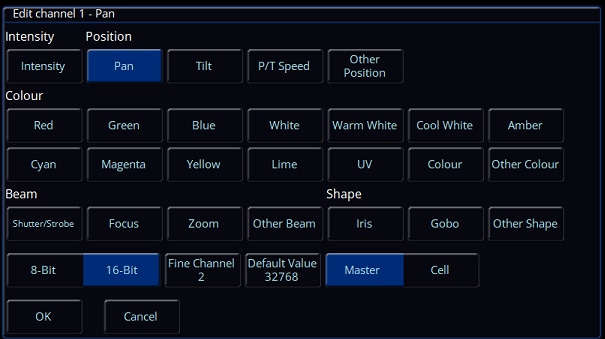
Hello Kisi When you start creating a fixture file with Fine or 16 bit resolution, select Pan then select 16-Bit on the bottom line, then when you select OK, CH1 will be Pan and CH2 will be Pan fine. Then when you select CH3 and select Tilt, the Fixture creator will put Tilt as Ch 3 and Tilt Fine as CH4
-
No worries, give me a few minutes. Edit: Send to your email Best, Charlie
-
@Charlie Newman Can you please send the fixture to my email kim@eventon.no Thanks best regards Kim Simensen
-
@Charlie Newman I know. We tried and the "fine tilt" and some other stuff its missing there.
-
Save solution files for use on Leapfrog48?
Archie D replied to Muller Light's topic in Solution & Solution XL
Thank you for this information, it definitely sounds like ZerOS Watchdog kicked in while loading the show file. It would have displayed a list of registers and then also a stack trace. Archie -

Save solution files for use on Leapfrog48?
Muller Light replied to Muller Light's topic in Solution & Solution XL
It was a crash dump (like a Linux shell window?) on the monitor. but then the monitor froze and i rebooted. -
Save solution files for use on Leapfrog48?
Archie D replied to Muller Light's topic in Solution & Solution XL
Hi Paul, Saving the setup within the show file as well theoretically shouldn't cause any problems. If you can recall - when the console crashed, was it a black screen with a load of white text (ZerOS Watchdog kicking in) or did the console just completely freeze, preserving monitor output too? Let me know how you get on later with LF48TEST1.zos, it has a few things disabled/removed to see if anything in the show file itself is crashing the LF48. One of my theories for this was that because the Leapfrog 48/96 came with 2 DMX universes as standard, with an optional upgrade card while the Solution comes with 4 universes straight from the factory, that ZerOS was trying to index a universe from the Solution (3 & 4) that didn't exist on the Leapfrog when loading in the show file (if the optional upgrade card for 2 more outputs isn't present). Hence, U3 and U4 are disabled in that show file. However, it is just a theory and could be wrong. It's all about experimentation to see what works! I look forward to hearing from you, thank you. Archie -
Hi @kisi, welcome to the forum! I should be able to do this this evening for you, however you're also able to do this within the desk itself under "SETUP" -> "Add New Fixtures" -> "Create New Fixtures" Please let me know if you have any questions. Best, Charlie
-
Need help to build a fixture file for my new light. Name of the light is Maverix - BSW 350 Can someone help me, I use a Vari lite FLX S24 console attached is the dmx chart. Best regards Kim Simensen Maverix-BSW 350.pdf
-
 kisi joined the community
 -
Save solution files for use on Leapfrog48?
Muller Light replied to Muller Light's topic in Solution & Solution XL
Hi Archie. I will try later. I wonder if, when i saved, i saved the showfile and setup, rather than just the showfile. Thanks Paul -
Save solution files for use on Leapfrog48?
Archie D replied to Muller Light's topic in Solution & Solution XL
Hi Paul, Thank you for providing your show file. Please could you see if this file loads into your Leapfrog 48? If it doesn't and the console crashes, what does the console show on the external monitor? Please don't panic that your cues/playbacks are missing by the way for this file - I'm simply juggling things to see what does what. Thank you. LF48TEST1.zos -
Save solution files for use on Leapfrog48?
Muller Light replied to Muller Light's topic in Solution & Solution XL
Showfile from Solution that wouldn't load on Leapfrog. WOZ-20125a.zos -
Save solution files for use on Leapfrog48?
Archie D replied to Muller Light's topic in Solution & Solution XL
Hi Paul, Sounds good, if you’re still experiencing difficulties tomorrow, please could you upload your showfile here if that’s okay? I can then see if I can potentially find anything on PhantomZerOS and my Solution XL (though if it loads fine onto a Solution and not the Leapfrog 48, I might be lost) When the Leapfrog 48 crashed, was it a ZerOS Watchdog message that appeared? I’m curious as to what it said, or what the crash behaviour was like.. Thank you and have a good rest of your day. Archie -
Save solution files for use on Leapfrog48?
Muller Light replied to Muller Light's topic in Solution & Solution XL
Hi Archie, Yes, I thought the solution and Leapfrog48 were the same. Both are running 7.14.4. File is a .zos. I have tried loading into phantom and saving, and will try on the desks tomorrow night. Thanks Paul -
Save solution files for use on Leapfrog48?
Archie D replied to Muller Light's topic in Solution & Solution XL
Hi @Muller Light, ZerOS showfiles are cross-compatible between ZerOS-based consoles, only with some data not being loaded (for example when you load a FLX showfile into a Solution, some data from the FLX won’t be loaded in). However, this won’t happen because Leapfrog 48 and Solution are identical, you’ll only receive a warning due to the different console types, but all data will be passed over. What software version are both of your consoles running? To see this, in the Output Window click ‘Other Windows’ (top left) -> System Information -> Software Version. What format is your showfile? Is it a .isf, or .zos? Many thanks, Archie -
Hello all, I have a Solution and tried saving a show and then loading it on a Leapfrog48. The Leapfrog crashed and had to be rebooted. Is there a way of saving a show on the solution that makes it compatible with a leapfrog? And vice versa? Thanks
-
Hi Simon, To adjust cue delay times on Solution, the best method is to use the MFKs (Multi Function Keys) instead of the encoder wheels. Navigate your cursor using the mouse or arrow keys to an 'Up' or 'Down' field, then tap ENTER to start editing the time. On the top right MFK, tap 'Delay'. It will now have the red LED lit, with the white background to show it is selected. Type in a time using the MFKs or an external keyboard, then hit ENTER again to submit this. For your instance editing the 'Down' field, the down delay has now been applied to your cue. You also have the option to do this at the same time when editing a regular up or down fade time for a cue for efficiency. When editing a fade time, simply switch between 'Delay' being selected or not, and when pressing ENTER to submit these changes, both changes for the regular fade time and the delay time will be applied in one go together. I hope this helps, feel free to ask any other questions you may have. Archie
-
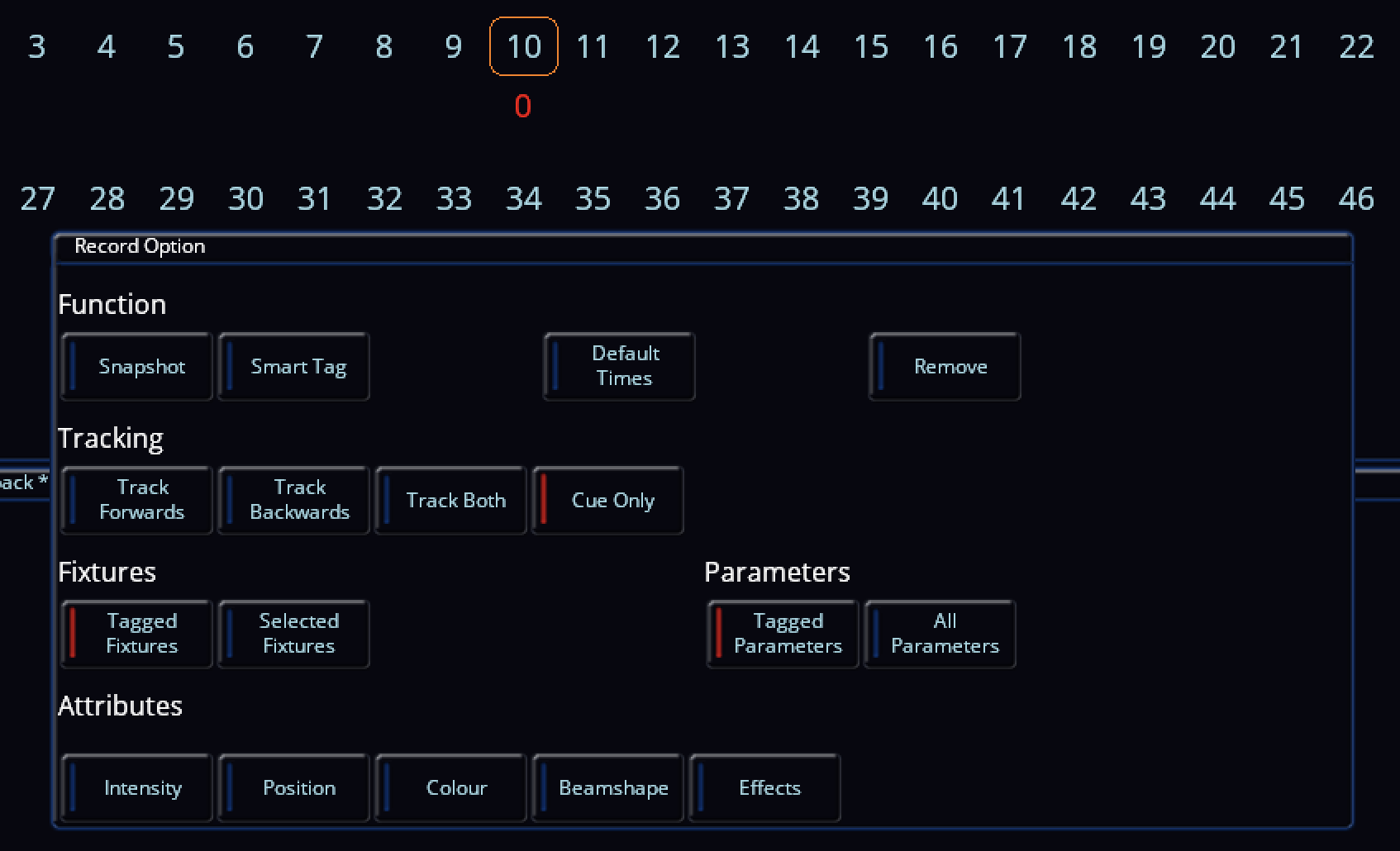
Hi Simon, Good to hear it seems to have fixed itself. I've just popped in to leave a few comments. You may have accidentally knocked the intensity encoder wheel slightly when making changes, so when re-recording default values with RECORD -> HOME -> Default, the intensity information is also included in the defaults of the fixture. Were you using RECORD -> HOME -> Default to do this after changing the intensity to 0%? This next bit is unlikely, but did the 'Intensity' selection button have a red indicator instead of blue? If it was blue, that intensity information won't be recorded into the defaults, so when you CLEAR CLEAR, the fixture will still go back to the original intensity default value. An image is attached with 'Intensity' under 'Attributes' having a blue indicator. The reason I say this is unlikely is because when you make a change (intensity in this case), when tapping RECORD, the changed parameters (which are therefore tagged) will be automatically in red to show they are selected. Though with this being said, in the image you have provided while trying to change fixture 5's intensity back to 0, 'Intensity' has a red indicator... Correct - the yellow D in 'Sources' as opposed to 'Intensities' indicates the intensity is coming from a default value of that fixture. A red P in 'Sources' indicates a manual programmer adjustment or modification. All in all, it is sorted, but I just thought I'd provide little segments of extra information in case anybody reading this isn't sure. Have a great week Simon. Kind regards, Archie

-
Hmm, well that's annoying. It seems to have reset itself. I've finished working & gone back to the -1 cue at the top and all is restored. You can see on the photo above that I was on this cue and the MH lights (108, 109) had a hard 0 value, while I was trying to reset Ch5. Now, all channels are blank as it should be. Happy to delete topic if that's appropriate.
-
Final dress rehearsal for panto tonight & just tweaking a few timings. How do I get to adjust Down Delay on a cue. When I click on Up or Down timings, I get Up Fade, Up Delay, & Down Fade on the scroll wheels but can't get to Down Delay - tried shift but can't think of anything else. Simon