All Activity
- Today
-
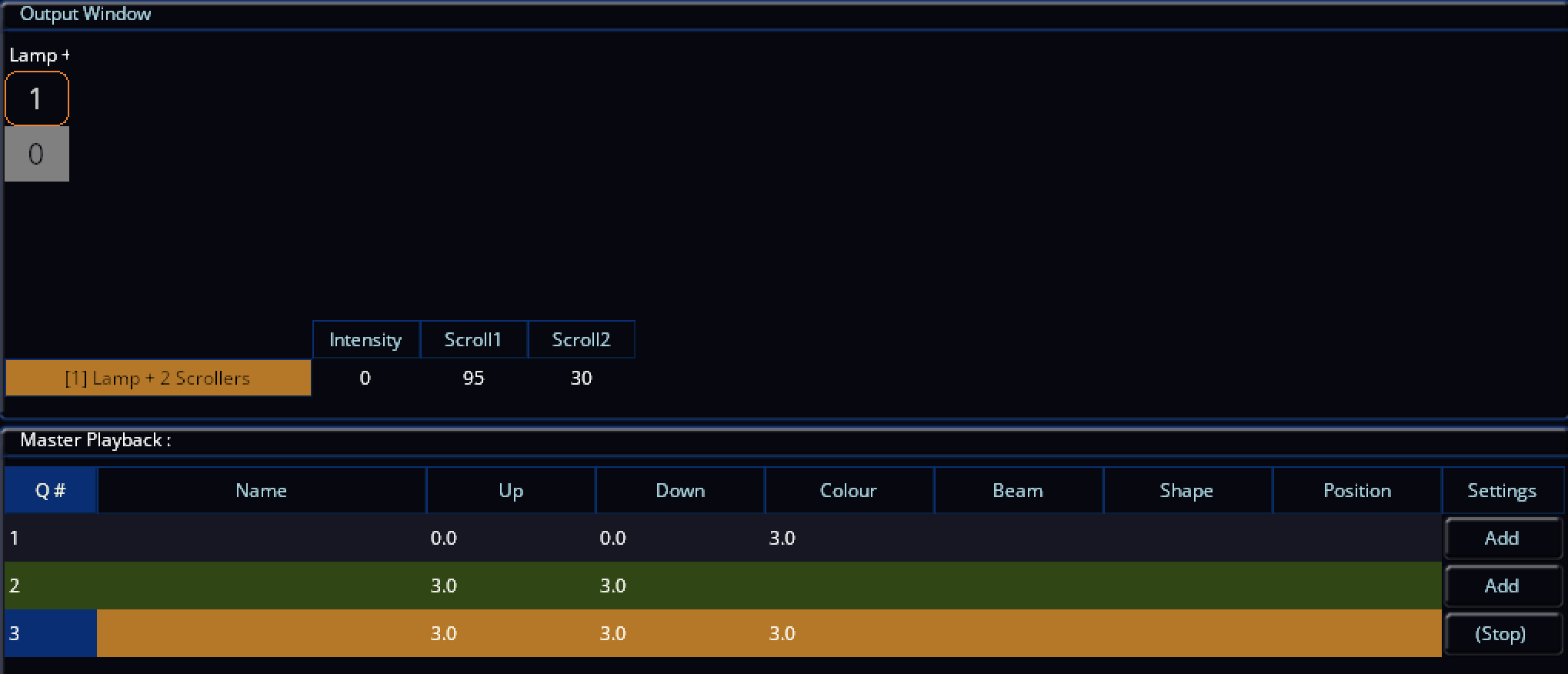
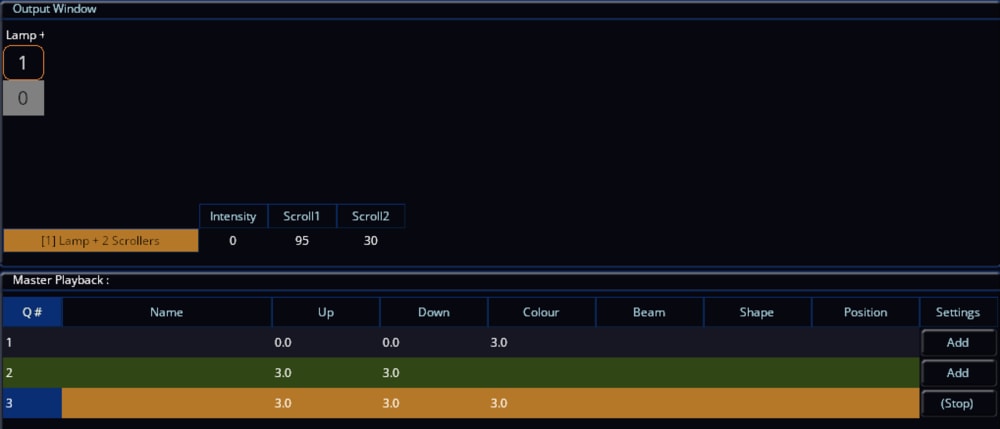
Forgive me if I've misunderstood the original post, but following this, here's a fixture file.. With this, we're using sub-fixtures instead of regular parameters in one single fixture like other fixtures would. This allows you to separate two parts of what we want to achieve here - to use this singular fixture as having the 'Lamp' (Intensity) defined as your actual dimming light (in your case - two linked to the same channel), and then configure the 'Scroll' part separately of the fixture to be on a different address, achieving your initial wish to 'link' the scrollers to the 'Intensity' of your incandescent fixture, where both the Intensity and two scrollers (together) can be as far apart in the DMX universe as you need, but the lamp must be the lower address (meaning the scroll can only be a DMX address after the lamp). Note that if you define the Scroll part of the fixture to be on e.g. DMX 57, that will be the first scroller. The second scroller will therefore be on DMX 58, with the Intensity being anywhere you wish (e.g. DMX 3 - completely away from the scrollers), again 'linking' the scrollers to the intensity. You will need to replace the Dimmer fixture you currently have patched in for your intensity with this one, but don't worry - the lamp intensity will work exactly the same, but giving you the additional scrollers. The scrollers will then actively 'listen' to the intensity and when it is at 0, the scrollers will use Move on Dark. We can see this in action with the grey background of fixture 1 on the second screenshot - the Scroll1 and Scroll2 values were both moving on dark at that time. And remember to always back up your show file before making critical changes like this. When patching this new fixture in after loading the .ift via SETUP > Load > IFT File, a 'Part' column will be added to the Fixture Schedule. This will indicate the Lamp and Scroll parts of the fixture as described above. See pictures and fixture file (.ift) below... Lamp + 2 Scrollers.ift

-
yea as @Davidmk says I don’t think you can keep the dummy lamp dark, you might as well just patch a scroller. Is there any scope to duplicate DMX address patching? Can’t currently get my brain sufficiently off work to think this through but I’ll give it some thought.
- Yesterday
-
@drscoop If you need this then using the same address is not possible. (Well, it is if you arrange the colour rolls appropriately but that would be a faff and still might be impractical.) @kgallen, as always, makes a good point but wouldn't keeping the dummy fixtures dark just mean that they skip straight to the last state in the cue list? Surely the dummies need to follow the real fixtures. Maybe they should be added to the same desk channel as the dimmer?
-
I think this is the way forward. It can go waaaay up theDMX and fixture list and always be dark. The scrollers will only ever move the other “real” fixture is dark, so it shouldn’t go rogue if the dummy one is never lit…. I think!!
-
I think this is what we’ll do next time - presently they’re set so we can apply asymmetric colour washes to the stage… so each one can be controlled individually. I’d hoped there may be a fix so that we could use 1 DMX address for the lamp but then add in 2 addresses for the scrollers. Using dummy fixtures may be the way forward if we want to retain this feature….
-
OK this is 10 years old comment, but this is where Jon told me the association of dimmer has to be within the fixture. I think at the time I was trying to do something vaguely similar to you where I had a patched Source 4 and wanted to associate the scroller with it to support move on dark.
-
The scroller uses the intensity channel of the associated fixture to know when ‘dark’ (as I’m sure you’re well aware). Scroller probably only has colour attributes. You might have to patch the lamp+scroller and patch the ‘lamp’ to an unused DMX address then use that bogus lamp fixture intensity to control your move on dark. I think early days of my FLX I asked a similar type of question and it just came down to you need that linked intensity channel to support move on dark. I know you probably don’t have time or access but this is a candidate for having a play to see what methods can be used to fool the desk whilst maintaining a usable workflow. I don’t think anyone left here knows how the desk actually uses the fixture information under lamp+scroller to know what cheats are viable.
-
Is there a problem putting the pairs of scrollers on the same address?
- Last week
-
Anyone know I how can I force a scroller to move on dark when it’s not a standard “‘lamp+1” fixture, but the scroller is a standalone fixture - and how to link to it’s dimmer channel so the desk knows when it is dark, if it’s not a straightforward patch? For context, I’m helping out a new theatre group and using scrollers for the first time in an FLX S. The rig has some pairs of tungsten fixtures wired back to the same dimmer channel, but the pairs of scrollers have their own DMX address, so I can’t use the multiple part standard fixtures as I need 1 dimmer channel but 2 independent scroller channels for each set of paired fixtures… I am using the generic “scroller” 1ch fixture on the desk and can build colour palettes etc but can’t work out how best to patch this to link to intensity to move the scrolls on dark. I kinda need a fixture that has 1 ch for intensity, but 2 channels, ideally individually selectable, for the two scrollers… Is there a workaround here? Thanks in advance…
-
Is there an archive of Zero88 software versions?
Archie D replied to Simonkbike's topic in General Discussion
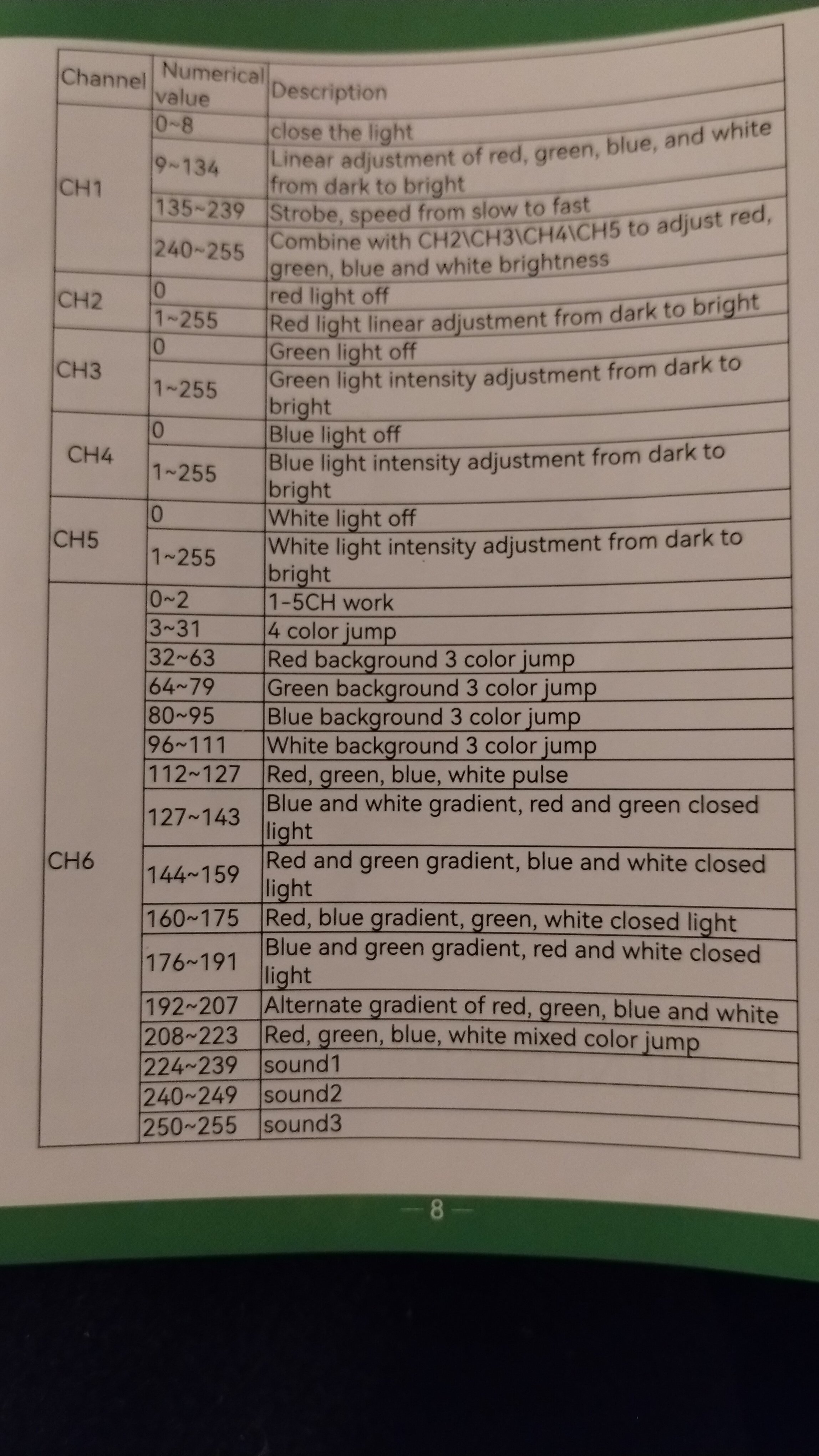
Hi Simon, Fantastic to hear it’s working for you. I expect the 9-134 is a locked colour as you say, and then 240-255 is to use colour..? I think the aim of it is to use 240-255 as a sort of ‘base’ intensity adjustment with a wiggle room of only a range of 15, with the colour values themselves allowing for fine intensity adjustments (0-255 on each of RGBW). Best of luck with your panto! Kind regards Archie -

Is there an archive of Zero88 software versions?
Simonkbike replied to Simonkbike's topic in General Discussion
My thanks gents & @Archie, I echo David's appreciation of your comprehensive response. I set Ch1 to Beam as a "Mode" channel on the thumb wheel & it's working as you suggest with values 9-135 controlling intensity but with all colours firing, overriding any colour parameter. Panto opens next week and I don't need a strobe so I'll leave it as I described in the OP for now. If I need a strobe I can come back here to confirm the sub-parameters setup. Many thanks Simon. -

Is there an archive of Zero88 software versions?
Davidmk replied to Simonkbike's topic in General Discussion
@Archie D @Simonkbike Very thorough response as always Archie. If I've missed this in your post I apologise but I'd suggest ch1 should have a default value somewhere between 240 and 255. This is because my reading of the chart suggests this will be needed to make the virtual dimmer work. -
Is there an archive of Zero88 software versions?
Archie D replied to Simonkbike's topic in General Discussion
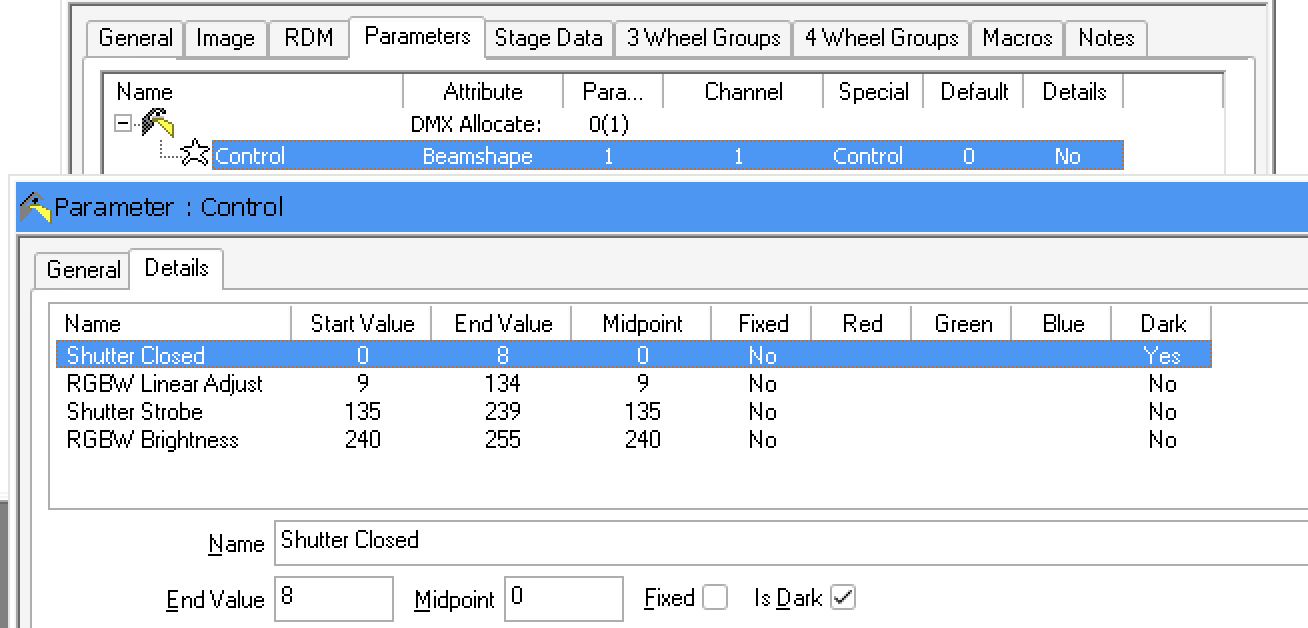
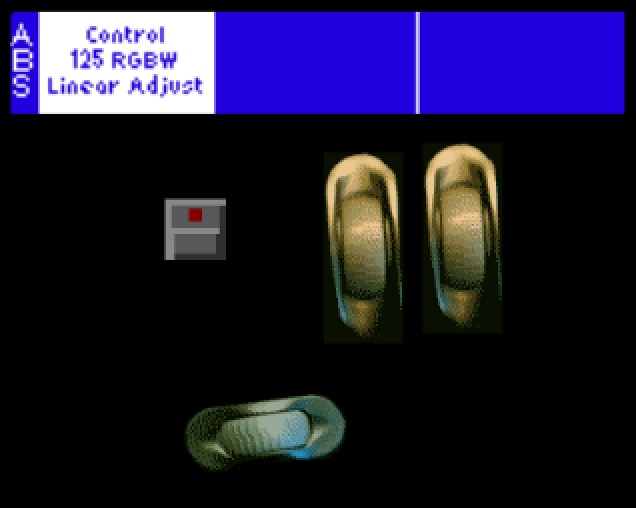
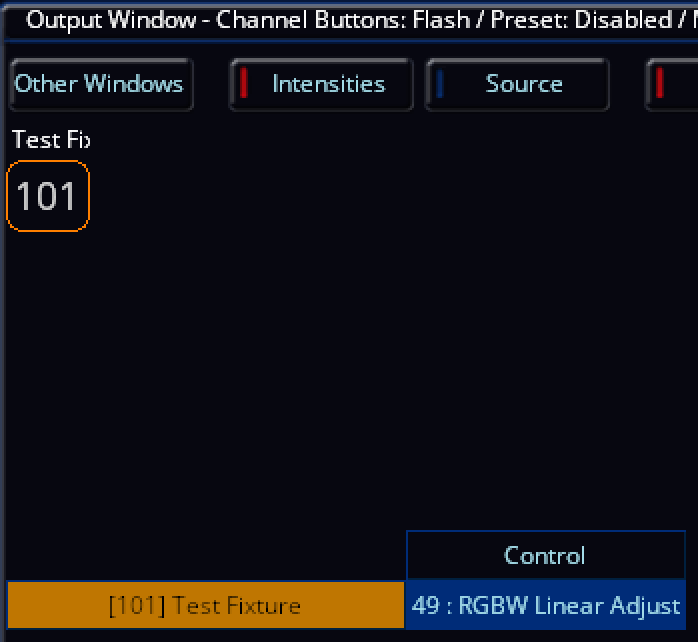
Hi Simon, thank you for sharing the DMX chart for your fixture. It appears that CH1 in the 9-134 range is the fixture's intensity control itself (I think), with 0-8 having the fixture in dark at zero intensity. Using a virtual intensity channel for this is a good idea (which you have done) and will scale the values accordingly. Out of curiosity, what manufacturer and fixture is this chart for? You're correct, you won't see how to set these in the ZerOS fixture creation tool, it appears to only be available on the fixture tools application. You'll find this within the 'Details' tab of the parameter you are editing, of which you can assign names to specific value ranges which will appear and change when controlling that parameter (on the Wheels LCD and external monitor in the Output Window). I've attached a picture below of what I've made for CH1 in the picture you have provided, along with the view of how it should look on the Wheels LCD and the external monitor in the Output Window. You'll notice that on the selected field named 'Shutter Closed' (DMX value 0-8), I have 'Dark' set to 'Yes' by ticking the 'Is Dark' box. This will now ensure those values work with Move on Dark on the desk, so when the fixture goes down into these values for zero brightness, ZerOS will 'know' it is at zero intensity and is safe to move parameters ready for another cue. You may not need this 'Is Dark' feature, as you're using virtual intensity, but I'm not sure. If you use Fixture Tools for this, and then decide later on to edit that fixture profile using the on-board ZerOS fixture editor, you might find it will break these added labels per value range, just something to be aware of. If there's anything else I can potentially help with, please feel free to ask.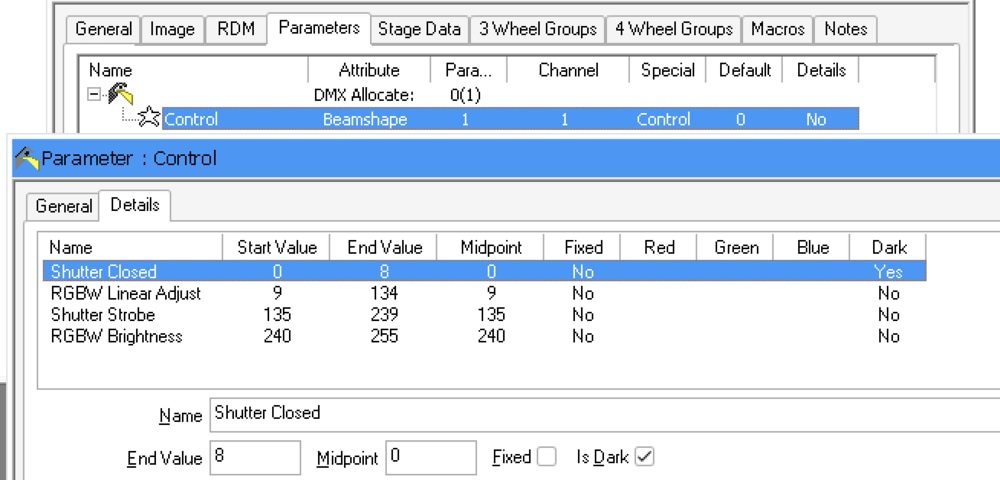
-
Is there an archive of Zero88 software versions?
Simonkbike replied to Simonkbike's topic in General Discussion
Thanks Archie, I'll check out the legacy files. I watched the YouTube tutorial for creating the fixture profile but I couldn't find quite what I need. The fixture has 6 channels. 2, 3, 4, 5 are standard RGBW. Ch1 & ch6 both seem to be mode adjustments. So far I have a profile with ch1 as a beam type with default 255 & with RGBW plus a virtual intensity channel it seems to be working. I've ignored ch6. I'm not exactly sure how ch1 works across all values: 135-239 is a strobe control so is 8-134 an intensity control? I can't see how to set these using the desk fixture setup. Do I remember these as sub-parameters in the old fixture editor.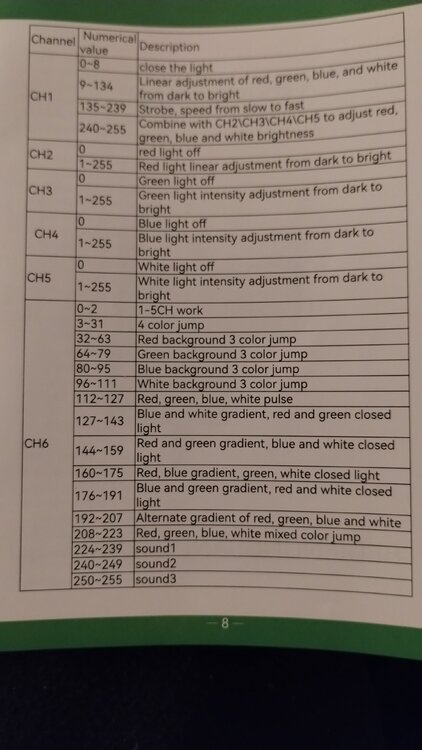
-
That sounds like a wonderful and straightforward solution to me, but I don’t feel like enough of an FLXS expert to really judge it...
- Earlier
-
Is there an archive of Zero88 software versions?
Archie D replied to Simonkbike's topic in General Discussion
Hi Simon, The PhantomZerOS installer .exe is contained in the .zip file for each ZerOS download. To download the zip file, select a legacy version of ZerOS in the Legacy section, and unzip the zip which has been downloaded. You can then install that by running the PhantomZerOS executable file. https://www.vari-lite.com/global/products/zeros-software Since ZerOS 7.13, there's been a new way to create fixture files that allows compatibility for multi-cell (selecting and controlling individual 'zones' or LEDs of a fixture), and also allows for quick on-the-fly fixture creation without needing the legacy Fixture Tools application package. To access this, enter SETUP > Add Fixtures > Create new fixture > Next. This will allow you to define how many channels the fixture profile has using + and - buttons in the window, or clicking the '# of channels' button to input a number (means you can quickly get there without multiple clicks of + and -). You can then define what those channels are by clicking the designated buttons for each one. In the dropdown below (which should be open by default), you can input which manufacturer, the model name, the channel mode and whether it is an RDM-enabled fixture. Once you've inputted everything, tap 'OK'. The console will then prompt you of how many fixtures you want to be added to the patch (returning to the normal thing that would happen after pressing 'Next'). If you need to export this fixture (or any fixture) to a USB stick, you can click 'Edit & Export' bottom right next to 'Back' and 'Finish'. In 'Edit & Export', you can re-save it to the library after editing, save to USB or delete it. When exporting, the fixture profile will be in the .zfix format, which can be loaded into any other ZerOS console. .ift personality files are still compatible, so if you wish to use the legacy fixture tools package still, you can. I hope this helps, if you have any more questions feel free to ask. -
Hi, I'm using a Solution desk so I'm now on the legacy Zeros v7.14 and I'd like to run the Phantom version equivalent to my desk. The website has legacy operation system but not Phantom emulator. Anyone know if it's available? Cheers, Simon. (NB: It's Panto season in UK so I'm prepping for our village show and hence the questions. Next job is creating a profile for some cheap chinese pin spots & I haven't used the editor for years. Wish me luck & don't be surprised if I'm back again later !) Simon
-
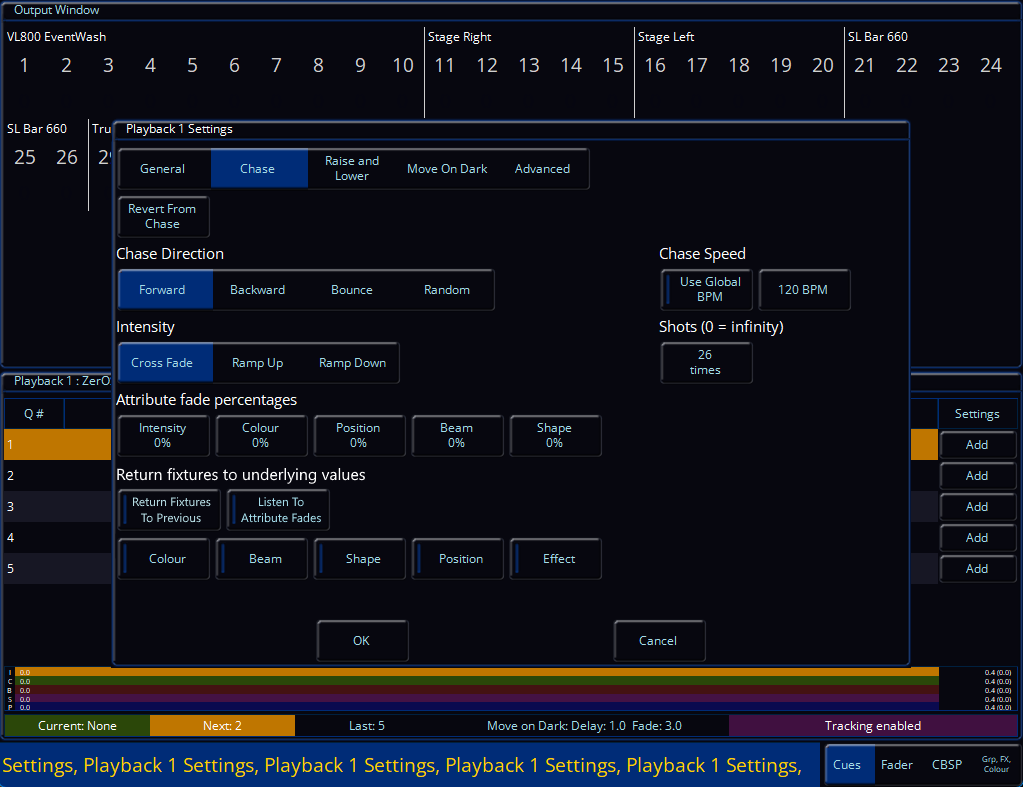
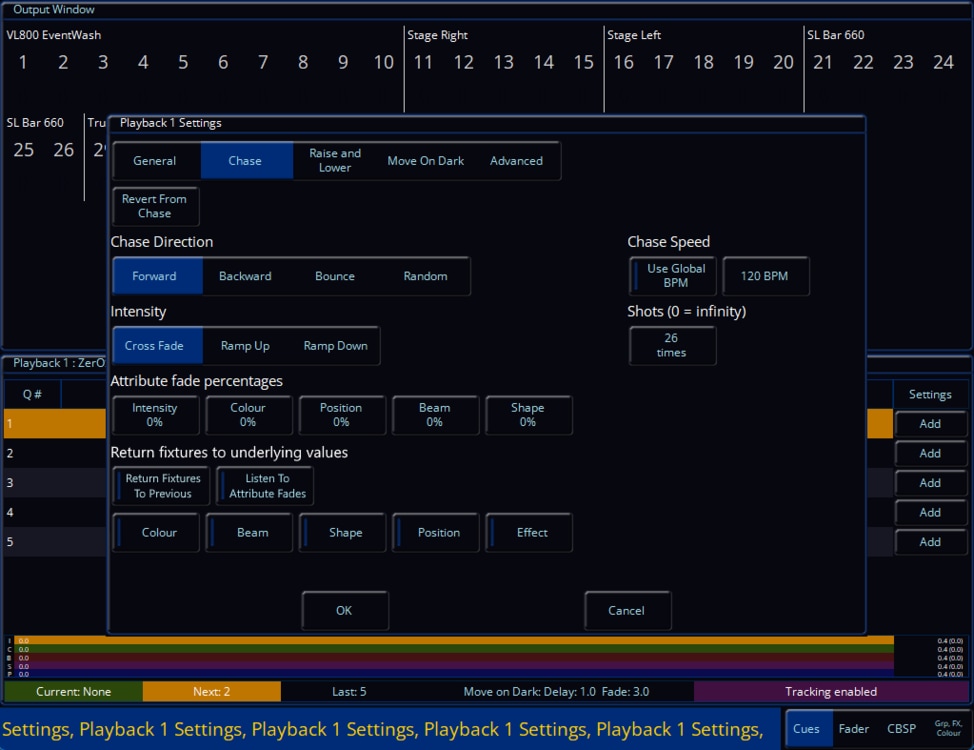
How about something like this? I've added two toggleable options at the bottom of the Playback Settings window in the 'Chase' tab (it also fills the blank space there) giving the ability to enable the return of fixtures to previous/underlying values during the chase running, with the extra option of 'Listen to attribute fades' for listening to the fade percentages above this added 'section'. With listening to attribute fades, as soon as it goes back to the previous/underlying values (explained below on how this would work*), it will use the fade percentages defined in the exact same way it would work fading step to step in the chase itself. It also gives the ability to enable or disable fading each separate parameter with the toggles below those two options, so you can return individual (instead of all parameters) parameters to their underlying values. As soon as you enable 'Listen to attribute fades' (making the selection indicator red), all parameters listed below will also go red. This will allow individual control of each one, or all. *The main principle of this new addition is that the console looks for fixtures hitting zero of any parameter in each step of the chase (this can be changed to be a selection in each cue of the cue settings instead perhaps, because values of zero are needed in some cases e.g. colour - but this would still work for intensity based ones), of which at that point they will return to any underlying data (in this case, the other playback, preventing the need to trigger and release multiple playbacks), a bit like how making a change in the programmer then double tapping the CLEAR key will return them to the previous values. I think this mitigates the situation we're currently in with using multiple playbacks painfully. Please let me know about any feedback you might have for this! Edit - I've just realised I forgot to include 'Intensity' in the toggleable section at the bottom (just imagine it's there for now!)
-
@kgallen The only thing I can think of is adding to the release playback (Rx) in the cue macros to allow release cue (Rx/y). Not hopeful it will happen because it would probably involve a lot to implement it.
-
@Sol That seems a nice idea but ye "Cannae change the laws of physics" (or LTP). If you did then everything else would break. @kgallen @Archie D Opinions on that?
-
I think it would have to be a ‘built in’ effect. The key to this as identified at the start is the ‘release’ instruction the desk needs. I’m not sure even user macros on FLX can make this any easier. Some sort of ‘auto release’ would be needed.
-
@Sol That seems a nice idea but ye "Cannae change the laws of physics" (or LTP). If you did then everything else would break. @kgallen @Archie D Opinions on that?
-
Thank you so much, @Davidmk, @Archie D, and @kgallen, for your helpful comments and explanations. I really appreciate that you took the time to think through my problem. Special thanks to @Archie D for the very detailed, bullet-proof instructions - they will be helpful! Honestly, I’m also glad to see that this is indeed a difficult task and not just something I failed to figure out on my own 😇 Let's hope that future versions will offer a simpler or more straightforward solution.
-
Just re-reading my initial post it’s a real dogs dinner! I’m glad @Davidmk and @Archie D have brought some clarity to the exercise with the neat use of a chase on the ‘master’ playback. Great work chaps!
-
@kgallen No worries. My post offered no more than a hint, you went further and @Archie D has gone right into the detail. I think, between us, we've covered this at every level.