
Simonkbike
-
Posts
55 -
Joined
-
Last visited
-
Days Won
6
Recent Profile Visitors
4,298 profile views



Simonkbike's Achievements




-
Many thanks Archie, I'm happy to have a go but my committee are a bit less enthusiastic. I tried White Light but had trouble creating an account. I confirmed my email but get a never-ending spinny circle when I log in. Will try again next week but you've given me a backup at least.
-
Ah, sad news I must have missed. I'll try White light. Thanks S.
-
Is @iank99 still around and servicing Zero88 desks? I have a Solution desk that needs some tlc - sticky faders, unreliable wheels. If not, are there any up-to-date recommendations for who to contact? Cheers, Simon
-
Just replying to bookmark this in my account for when I need the Apps on a new phone.
-
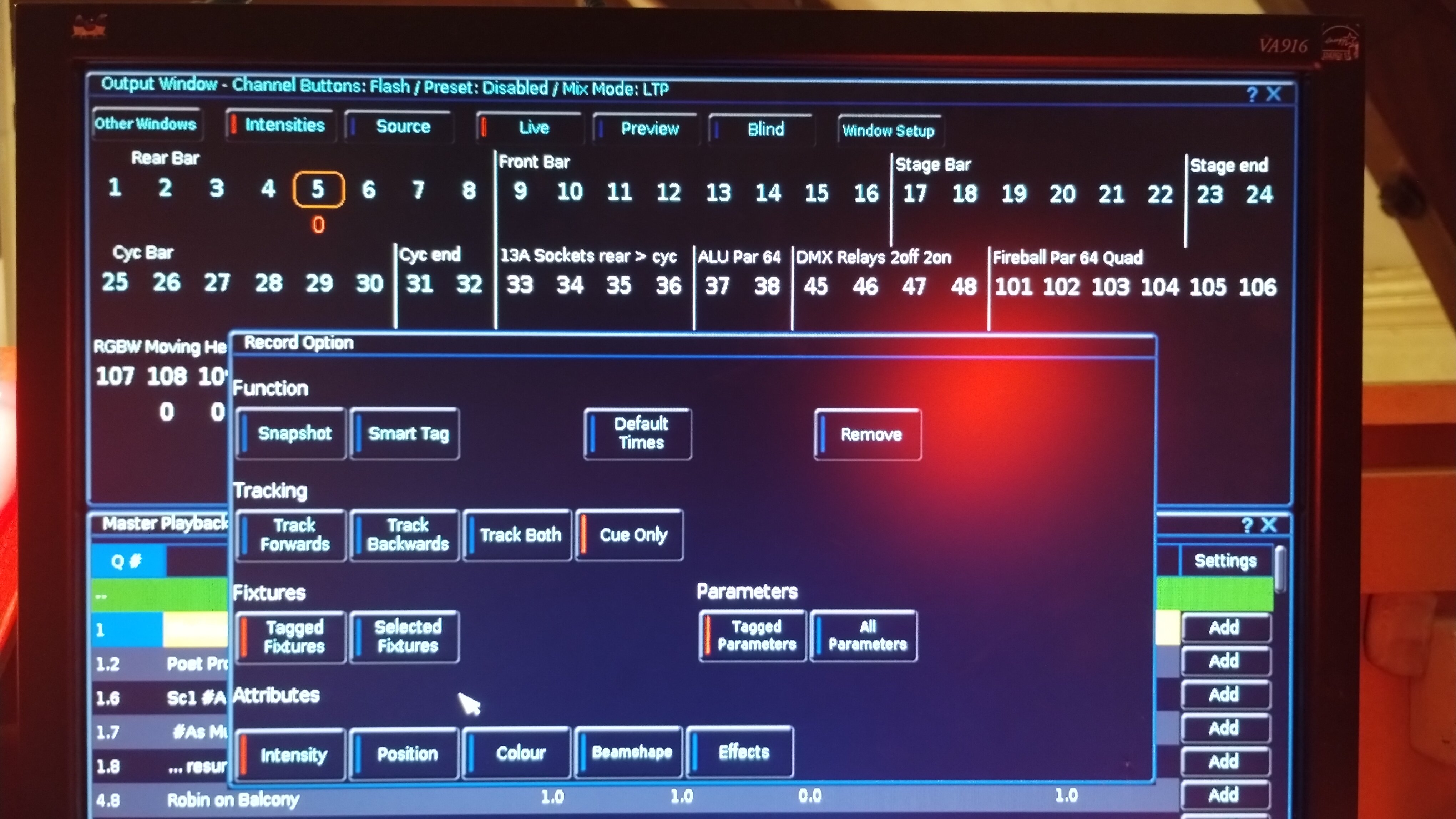
Hmm, well that's annoying. It seems to have reset itself. I've finished working & gone back to the -1 cue at the top and all is restored. You can see on the photo above that I was on this cue and the MH lights (108, 109) had a hard 0 value, while I was trying to reset Ch5. Now, all channels are blank as it should be. Happy to delete topic if that's appropriate.
-
Final dress rehearsal for panto tonight & just tweaking a few timings. How do I get to adjust Down Delay on a cue. When I click on Up or Down timings, I get Up Fade, Up Delay, & Down Fade on the scroll wheels but can't get to Down Delay - tried shift but can't think of anything else. Simon
-
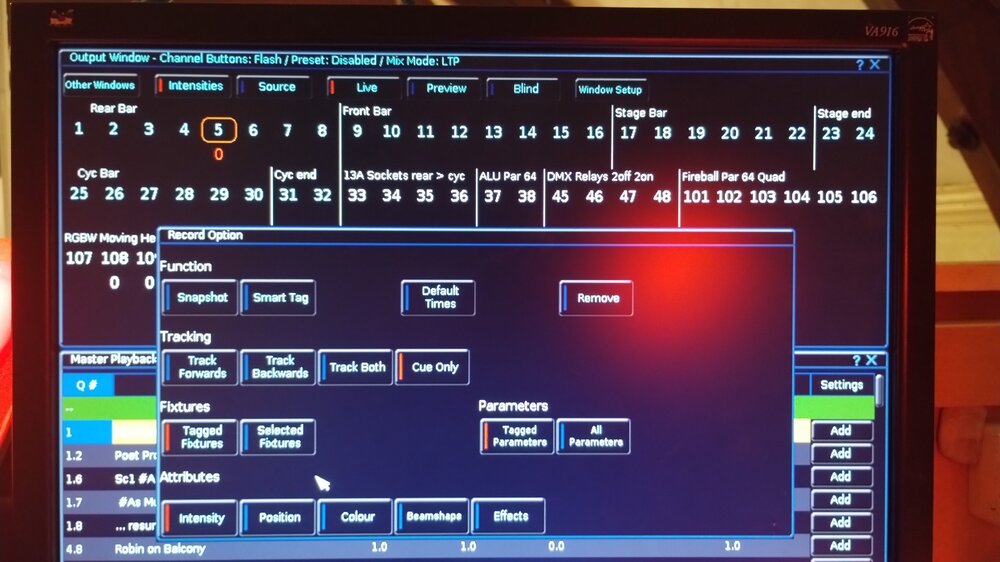
I was changing defaults on my moving head lights and now fixture #5 has a Default intensity value of 5. (ie. on the source screen it has yellow "D") I tried re-saving it to zero but it won't stick, reverting back to 5 when I clear, clear. Settings are as shown, and I've tried variations of tagged vs selected fixtures. Any suggestions what I'm doing wrong? I don't think any other option for the yellow D applies. Simon.
-
Is there an archive of Zero88 software versions?
Simonkbike replied to Simonkbike's topic in General Discussion
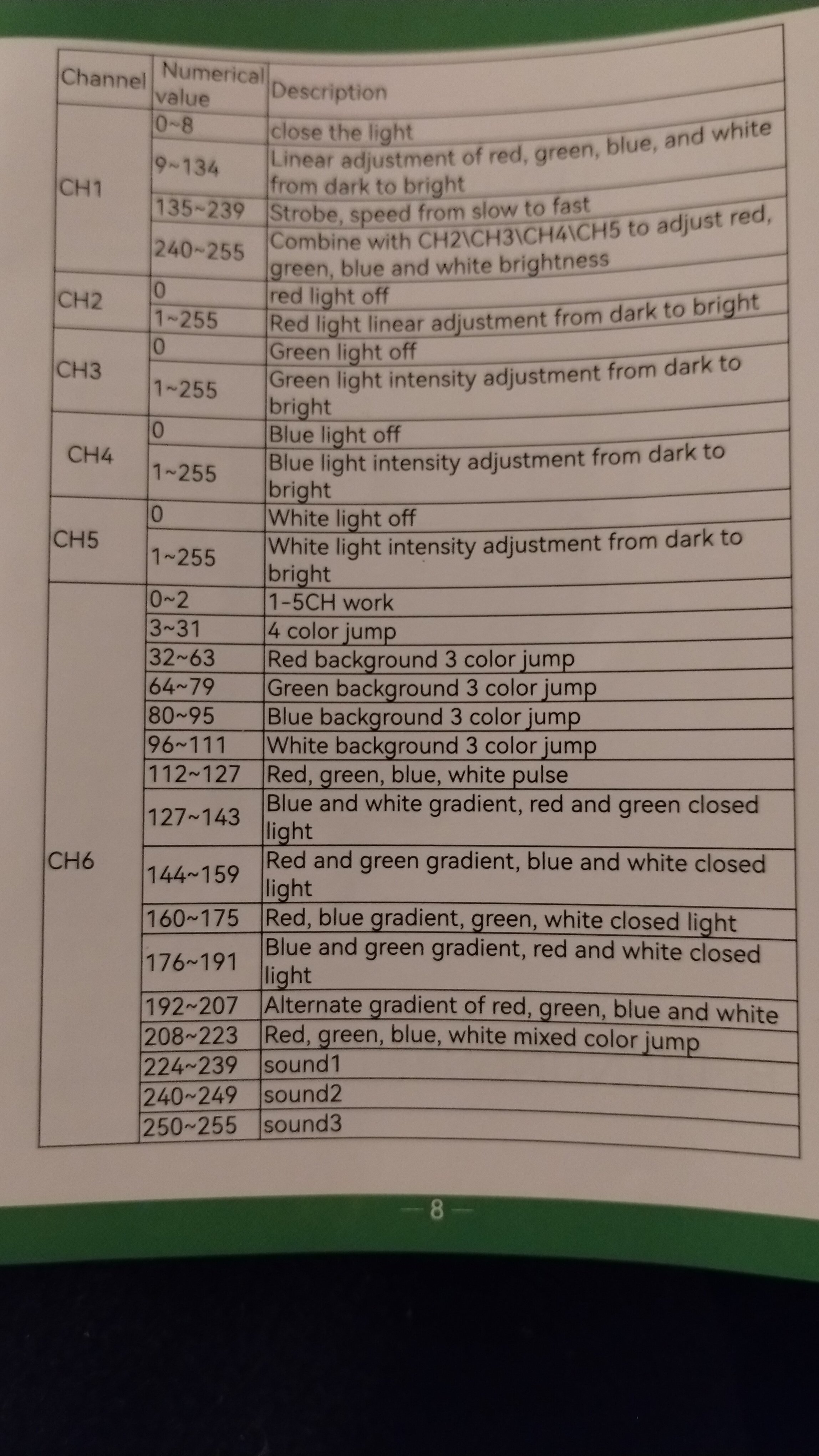
My thanks gents & @Archie, I echo David's appreciation of your comprehensive response. I set Ch1 to Beam as a "Mode" channel on the thumb wheel & it's working as you suggest with values 9-135 controlling intensity but with all colours firing, overriding any colour parameter. Panto opens next week and I don't need a strobe so I'll leave it as I described in the OP for now. If I need a strobe I can come back here to confirm the sub-parameters setup. Many thanks Simon. -
Is there an archive of Zero88 software versions?
Simonkbike replied to Simonkbike's topic in General Discussion
Thanks Archie, I'll check out the legacy files. I watched the YouTube tutorial for creating the fixture profile but I couldn't find quite what I need. The fixture has 6 channels. 2, 3, 4, 5 are standard RGBW. Ch1 & ch6 both seem to be mode adjustments. So far I have a profile with ch1 as a beam type with default 255 & with RGBW plus a virtual intensity channel it seems to be working. I've ignored ch6. I'm not exactly sure how ch1 works across all values: 135-239 is a strobe control so is 8-134 an intensity control? I can't see how to set these using the desk fixture setup. Do I remember these as sub-parameters in the old fixture editor.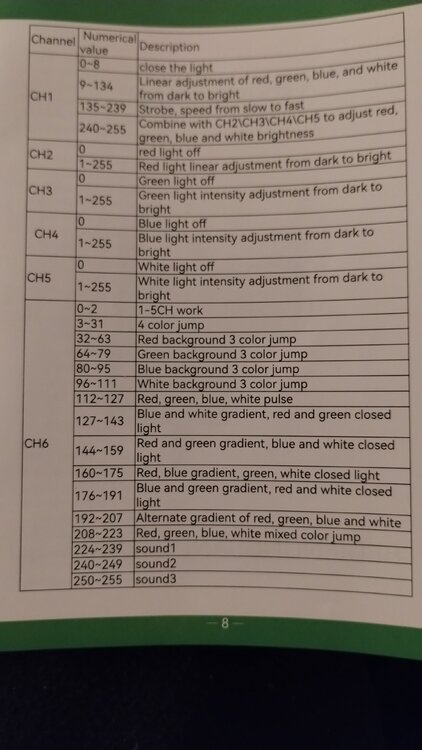
-
Hi, I'm using a Solution desk so I'm now on the legacy Zeros v7.14 and I'd like to run the Phantom version equivalent to my desk. The website has legacy operation system but not Phantom emulator. Anyone know if it's available? Cheers, Simon. (NB: It's Panto season in UK so I'm prepping for our village show and hence the questions. Next job is creating a profile for some cheap chinese pin spots & I haven't used the editor for years. Wish me luck & don't be surprised if I'm back again later !) Simon
-
They are kinda small - it would be nice if they were labelled too! S.
-
Hi Archie, Thanks for the reply. That's very sneaky - I like it ! Next rehearsal is Sunday although I may be in the Hall tomorrow so I'll give this a try. Simon
-
I'm sure it's buried somewhere but can't find how to do simultaneous button presses on Monitor for iPad. I'm on a Solution desk (but it's not desk specific so I've put the question here) and I want to swap between Playback cue lists on my remote Monitor. On the Solution desk I press-and-hold Memories then press the Go button on the chosen cue stack. The Phantom manuals mention a right-click to hold but that's not an option on iPad, so how do I do this? Simon
-
As I was about to post, I realised I'd not checked the patching. I found the Lantas have an updated patch profile so re-patched but the error remains. I've re-posted above. S.
-
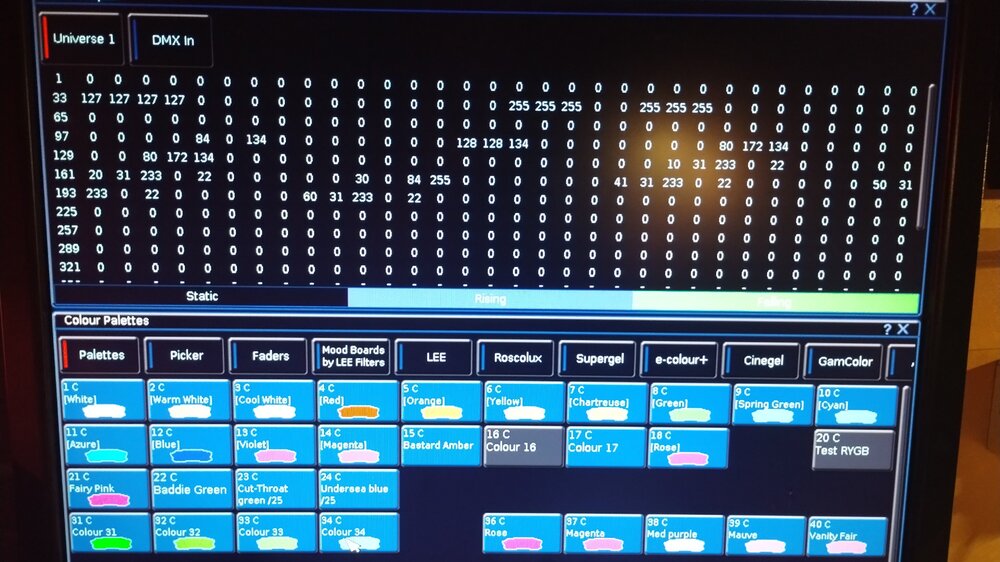
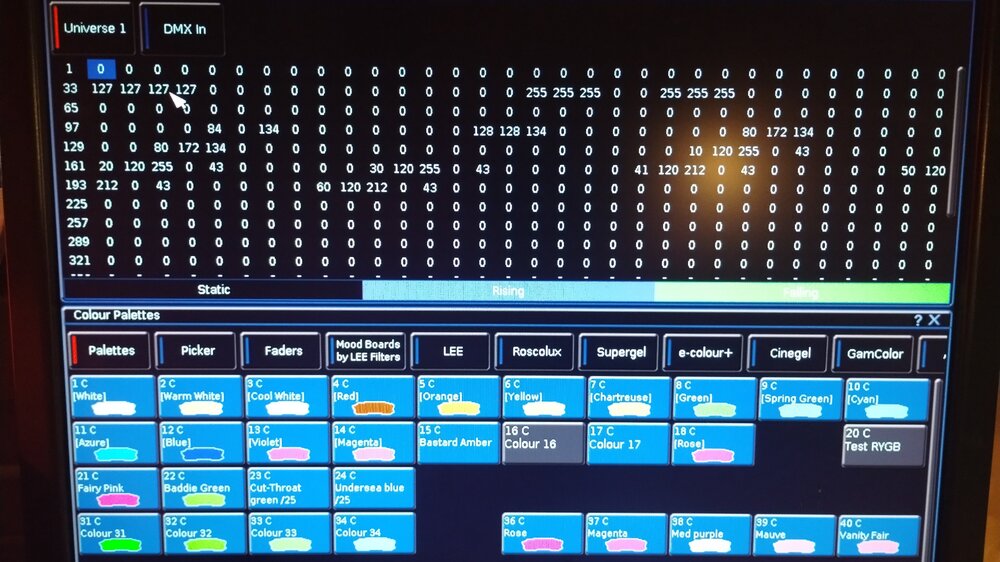
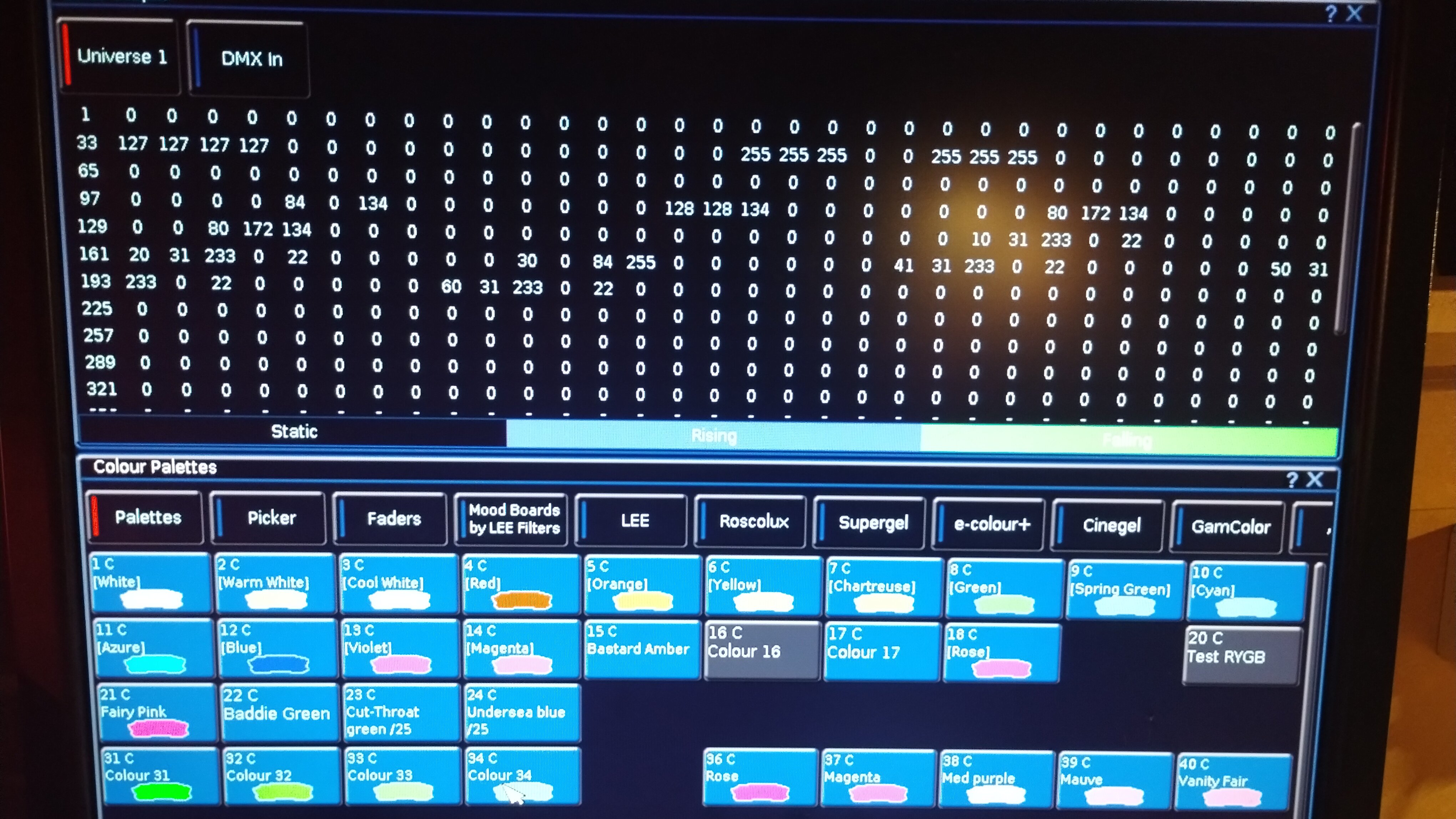
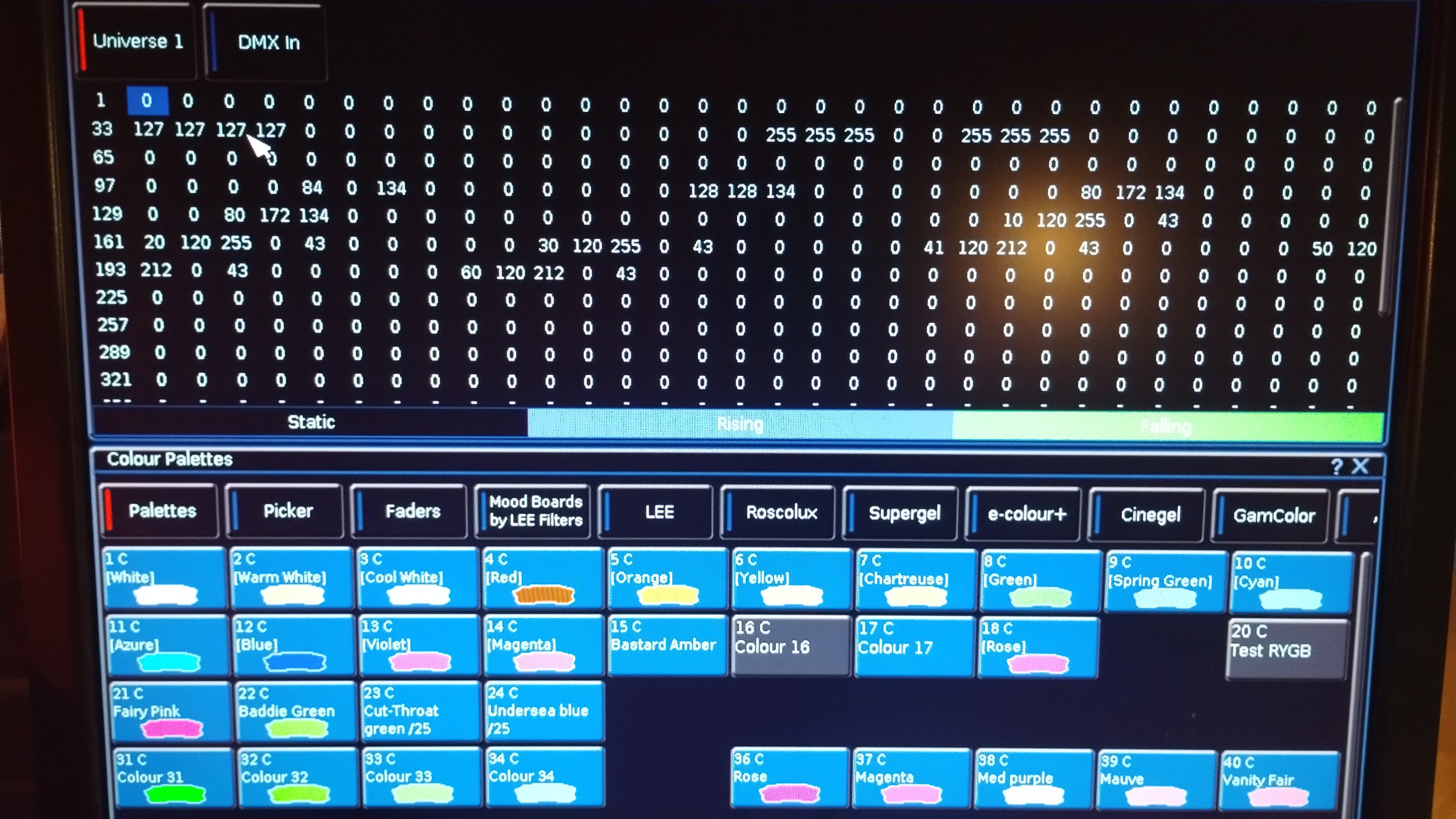
I have some Lanta Fireball par64 quad rgbw parcans on my rig which, when set to the same colour palette are receiving different dmx values. Our Panto baddie always has his own colour but it changes from year to year. I saved a new palette "Baddie Green", then a few options to choose from (nos 31-34) , using Lee filters, see photos. If I use palettes 31-34 I get consistent colour on all lights, but I'd have to update each cue if I want to change it. If I <update> Baddie_green with the selected colour, then apply it to my lights, I get different dmx values output to different lights. On the photo 1, the six lights start at dmx 151 and the 1st intensity values are set to 10, 20, 30 etc. In that test the 3rd light gets different values. I can reproduce this when I use any of the renamed colour palettes e.g Undersea_blue. In that case in photo2, lights 1-3 get 120-255-0-43 and lights 4-6 get 120-212-0-43. I noticed this as I've been programming the show, where one light was wrong. When I corrected it, all seemed fine for a while then it reverted to the error. Any ideas anyone? Simon