All Activity
- Today
-
FLX S48 Custom Fixture Macro Select / Colour Mix Editing
Archie D replied to Rye's topic in FLX S24 & FLX S48
Hi Rye, Great to hear you were able to get it working. Correct, fixtures that have red text in the Fixture Schedule are non-library fixtures. Yes, the on-board Fixture Creator & Editor within ZerOS allows for longer parameter names than Fixture Tools does. This is because Fixture Tools supports legacy desks (such as the Frog Range, Jester Range, Illusion 500 etc.) which only supported a certain amount of characters for parameter names. The ZerOS Fixture Editor allows for longer names because it doesn't have to contain compatibility for legacy desks which hold that limitation. Fixture Tools only supports loading .ift files and not .zfix files. This means that zfix files cannot be loaded into Fixture Tools to be edited, and can only be modified on the desk. One of the reasons of that is zfix files can contain multicell information, and Fixture Tools does not support multicell functionality. However, once you load in a .ift fixture file into the desk (SETUP -> Load), you can actually edit it in the ZerOS Fixture Editor from Add Fixtures. Beware though, making any edits to anything in that fixture personality within ZerOS will remove all parameter detail information you have added from Fixture Tools as it writes new parameter information when you re-save the file (in the zfix format this time), so lengthening parameter names once loaded into ZerOS isn't possible. I would only recommend doing so if you don't have any parameter detail information in that profile that is important. I hope this helps, let me know if you have any questions. -

FLX S48 Custom Fixture Macro Select / Colour Mix Editing
Rye replied to Rye's topic in FLX S24 & FLX S48
Thanks Archie It took a bit of experimenting, trial and error and then a while inputting all of the details but I was able to get it all working. The fixture is showing up Red in the Fixture Schedule - which I assume is because it's a non-library fixture The only very minor gripe I had was the Fixture Editor only let me have parameter names with a max of 7 characters, so I had to shorten the parameter names - but not actually a big deal. I didn't end up needing to - but is there a way to like, export an existing fixture from the desk to then edit in the Fixture Editor? I tried to do something like that, but since the desk exports as .zfix files and the Editor only uses .ift I'm guessing you can't edit an existing fixture, so you'd have to create a new one from scratch, which is what I did -
Hi @DALX, Slight query - I can't seem to replicate your copying procedure using syntax. Typing the syntax to copy cue 1 on playback 1 to cues 5, 10, 15, 20 gives invalid syntax at the second period (1/1 Copy To 5.10. <-) as only one decimal point is allowed. This means cue 1 can only be copied to cue 5.1, disallowing the period to be used as a separator. Alternatively, using the copy window (Z/Shift -> Copy).. From 1 To 5.10.15.20 returns a new cue numbered 5.1. ZerOS is interpreting my entry as a point cue here too rather than multiple cue numbers, given that point cue numbers can only be up to 2 decimal places. The second period invalidates the further numbers anyway. In ZerOS, you can copy multiple cues to a single cue number. That single cue number acts as the starting number. For example, copying cues 1>5 to cue 10 will create cues 10 to 15. Copying cues 1+3+5 to cue 30 will create cues 30, 31 and 32. In the Copy Window, only the 'From' input box allows + and > whereas the 'To' input box doesn't. Please could you elaborate further on what you're doing to achieve this? I might be missing something. Many thanks
- Yesterday
-
During a lighting workshop last week I was asked can you copy one cue to multiple cue locations at the same time to speed up plotting. I tried Copy To 5.10.15.20 as a syntax and it copied a cue to cue numbers 5, 10, 15 and 20 using the period . as a separator. I have tried to find this in the ZerOS handbook but have not found it. I know it works but I was hoping to find a description to see more Copy syntax options ? Can someone point me in the right direction please ?
- Last week
-
FLX S48 Custom Fixture Macro Select / Colour Mix Editing
Archie D replied to Rye's topic in FLX S24 & FLX S48
Hi @Rye, The extra window that opens when you press the encoder wheel's centre button is to display the 'Details' of that parameter on that encoder wheel. These are defined within the fixture profile itself. The on-board fixture editor (found in SETUP -> Add Fixtures -> Create new fixture, or from editing an existing fixture) is designed for quick and easy operations and doesn’t contain the ability to add or edit details of parameters. Details in a parameter are defined ranges that can be labelled, have a colour or image attached etc. For example, 0-20 is Macro 1, 21-40 is Macro 2. You'll notice the labels changing as you scroll through ranges on the encoder wheels. Details are then assigned as buttons in the window you found, its a quick way to jump to parameter ranges saving endless scrolling on the encoder wheels. To add details to parameters, you’ll need to use the Fixture Tools application. This requires a Windows PC, or a computer running Wine to emulate the Windows application (works on my Mac). Within each parameter is a 'Details' tab. Note that Fixture Tools will export fixture files in a .ift file format rather than the modern .zfix format. This means multi-cell can only be done in the on-board fixture editor in ZerOS - just something to be aware of. I’ve had a look for the manual of that fixture too, and it doesn’t seem to be anywhere. If you can find out what each channel does on your fixture, you can start to build up a fixture profile in Fixture Tools. Then, you can specify parameter detail ranges for the Macros along with any other parameter that requires the same. I hope this helps. Feel free to ask any questions. Apologies if any formatting went weird, typing this up on a phone! -
For context, we have these lights (AVE Pro-Can HEB12) that, as far as I can tell, are discontinued and also the manual for it just doesn't seem to exist. It also doesn't appear in any exisiting lighting fixture libraries as from what I've seen. I was able to figure out how to make a custom fixture, and even using the filter setting to find an existing one that's similar enough to it, so no problems there It has a Colour Mix/Macro Select for the last 2 channels on it's 10 Channel mode - and when you click on the parameter for lights for these it takes you to another window with with all the options for that Macro For example, for the BeamZ BBP96 (the closest similar light I found), on the 9th channel it has Colour Mix Macro Select, with a bunch of options like Colour Auto Run, Colour Gradient, Sound, Strobes etc. The lights we have have a similar selection of Macro options, but not quite the same. But as far as I can tell, you can't seem to be able to edit/create the options for these. Is there some way to do this that I just haven't found? Either for making a new fixture or editing an existing one.
- Earlier
-
Hi Martin, Really glad to hear this - I'm glad you've got it sorted. Nice find on the extra setting for the NVRAM! Happy to help. Archie
-
Hi Archie - yes, it is the Flat Panel Type setting which needs to be 'XGA 1x18' rather than 'Auto' which is what the default setting is. For information, the only other setting which needs to be changed after defaults have been loaded is under Advanced Chipset Control, where 'Enable Memory Gap' needs to be set to 'Extended' rather than 'Disabled'. Otherwise you get a permanent 'Non-volatile RAM Fail/Replace Battery' message at boot-up. Very many thanks for your help - this was driving me insane! Martin
-
@Archie D has made this assumption because you have posted in FLX S. If you actually have a full FLX then recording a macro that is then triggered by OSC would be the way to go. However, all may not be lost if you are really on FLX S. You could record a cue that releases playbacks (see manual here) and then trigger that from OSC. A similar cue could also trigger all the cues you want to run. I'm not sure of the timings (whether releases are done before or after triggers) but you could even try putting all your releases and triggers on the same cue.
-
Hi @Rye, The easiest option here if you were using a full-size FLX would be to use macros. Macros have the ability to capture press and hold events on front-panel buttons, therefore you can record a macro that records key presses (not syntax commands), hold CLEAR and tap the Fader Function button (same as the FLX S Channels/Playbacks button). You could then execute this macro via OSC.. /zeros/macro/1 for example. As you're on FLX S however, the above won't work as user macros are not a feature of FLX S consoles. There isn't an OSC command to release all playbacks, so you're right - you would have to release each one with its own individual network cue. To simplify operation though, you could make each network cue follow on from the previous one so you can trigger the first playback release network cue and each playback (1-96) gets released at the same time. If you were using QLab, this could be done with a group cue instead. I hope this helps. Archie
-
Silly me - yes, that of course could have been a possibility. Probably was unstable in some way, making the main console drop out so the backup took over as the main was considered 'offline'. Fantastic to hear your main FLX didn't crash. Anyway - I hope the show went well, great pic!
-
Maybe there is a better way of doing this - but I'm setting up a show with Audio/Light cues that sync up - and found Multiplay to be a great tool. I've been able to get it to work no problem so far - but I was wondering if there's an OSC command that like, essentially just clears all current lighting/playbacks. We have a bunch of random colour playbacks set up at the moment, and a handful of other cue stacks for some old shows. I've occasionally run into issues where something I'm doing on OSC/Multiplay can be interferred if there's any pre-existing playbacks that happen to already be running. I know there's the option to clear all Playbacks by holding Clear and then tapping the Channels/Playbacks button, but I was wondering if there's a Trigger command that does the same thing. There's the Blackout one, but that just dims without clearing/releasing. There's also the Release command - but that only does a specific Playback or the current Playback. Best thing I could think of was just running like, 96 commands to manually clear every single Playback - but that seemed like overkill and a hassle.
-
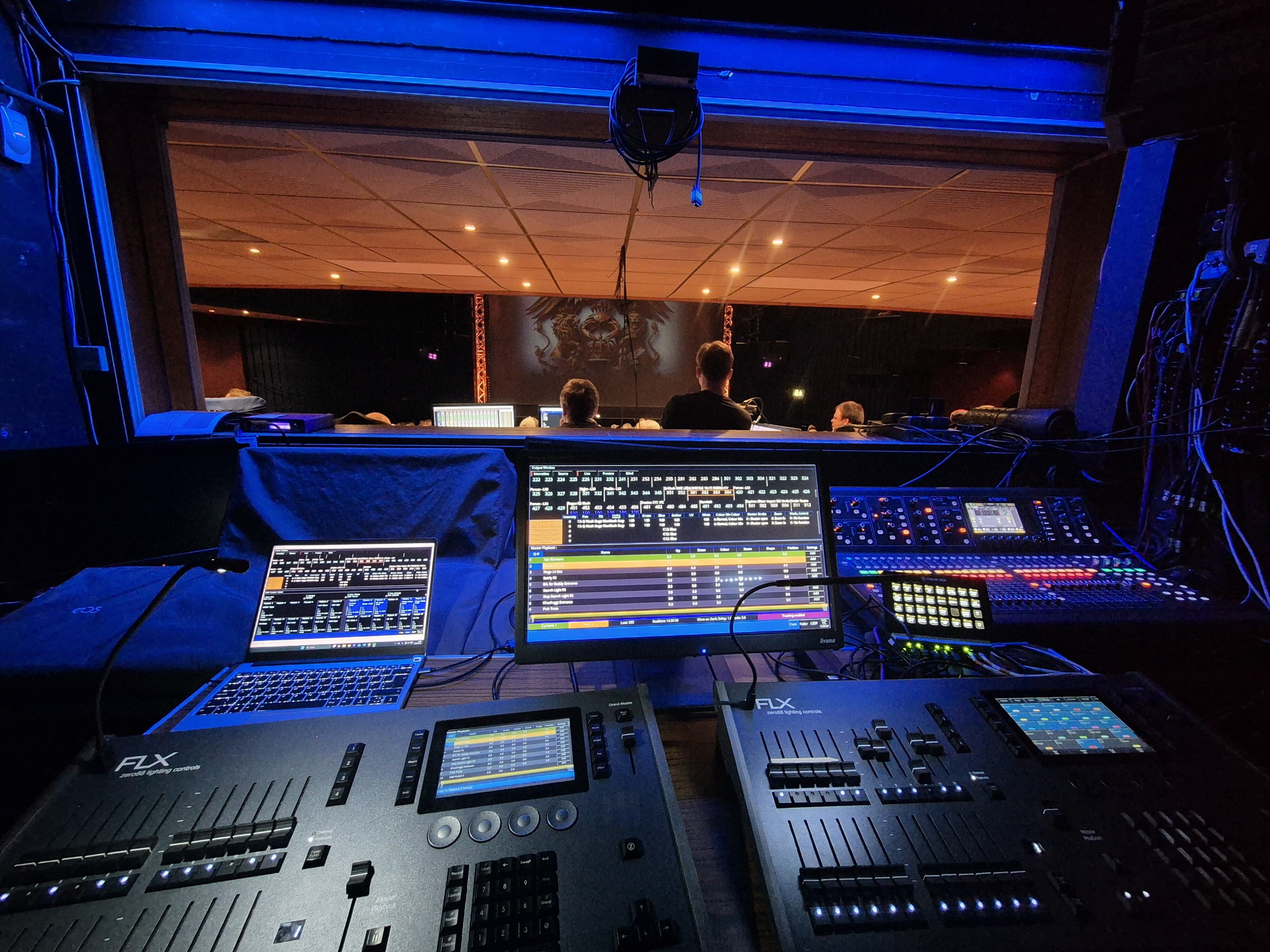
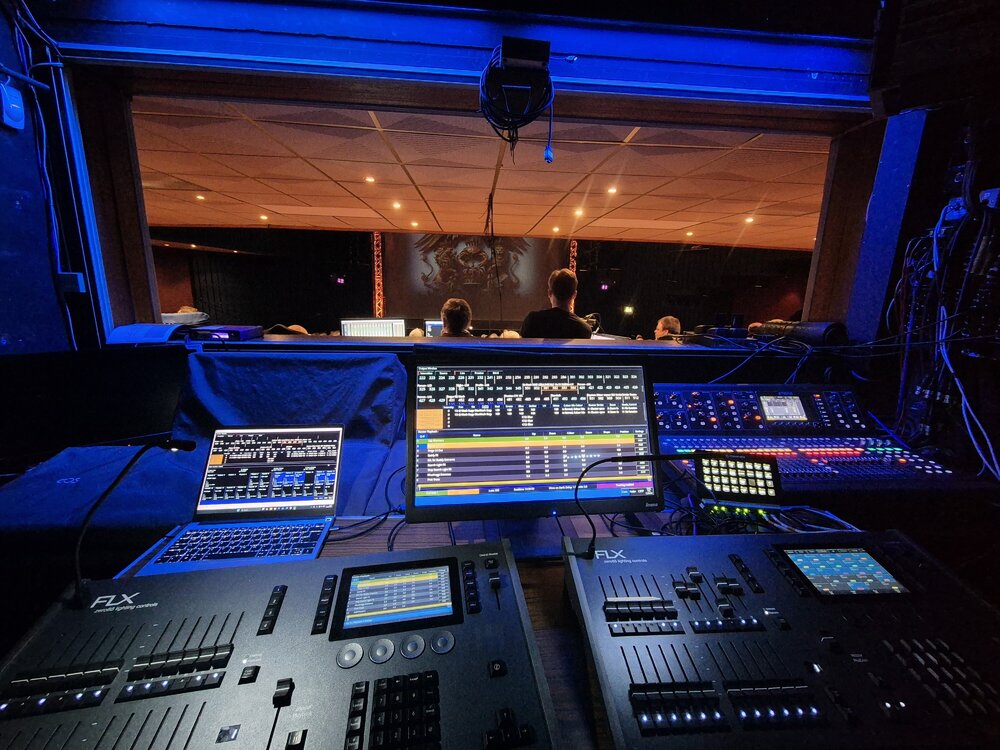
Not sure really! I was running two switches, three Art-Net Nodes, one Wi-Fi AP, one Stream Deck, and a local laptop networked in for running ZerOS Monitor. Vari-Lite email support could only offer the suggestion that it would have been due to an unstable network. There could be some mileage in that as my laptop did occasionally drop connection to ZerOS Monitor. Anyway, its all over and done with now, I never ran them in tracking, however was ready to rapidly connect in the backup ethernet cable if my primary desk crashed during a show, which it didn't (hooray!) Pic for prosperity - stuck at the back of the box behind the venue desks - main sound FOH, running audio feeds into venue mixer
-
Hi Martin, No problem - let me know how you get on. Archie
-
Thanks Archie - I'll check this out once I'm back in front of the console. Much appreciated!
-
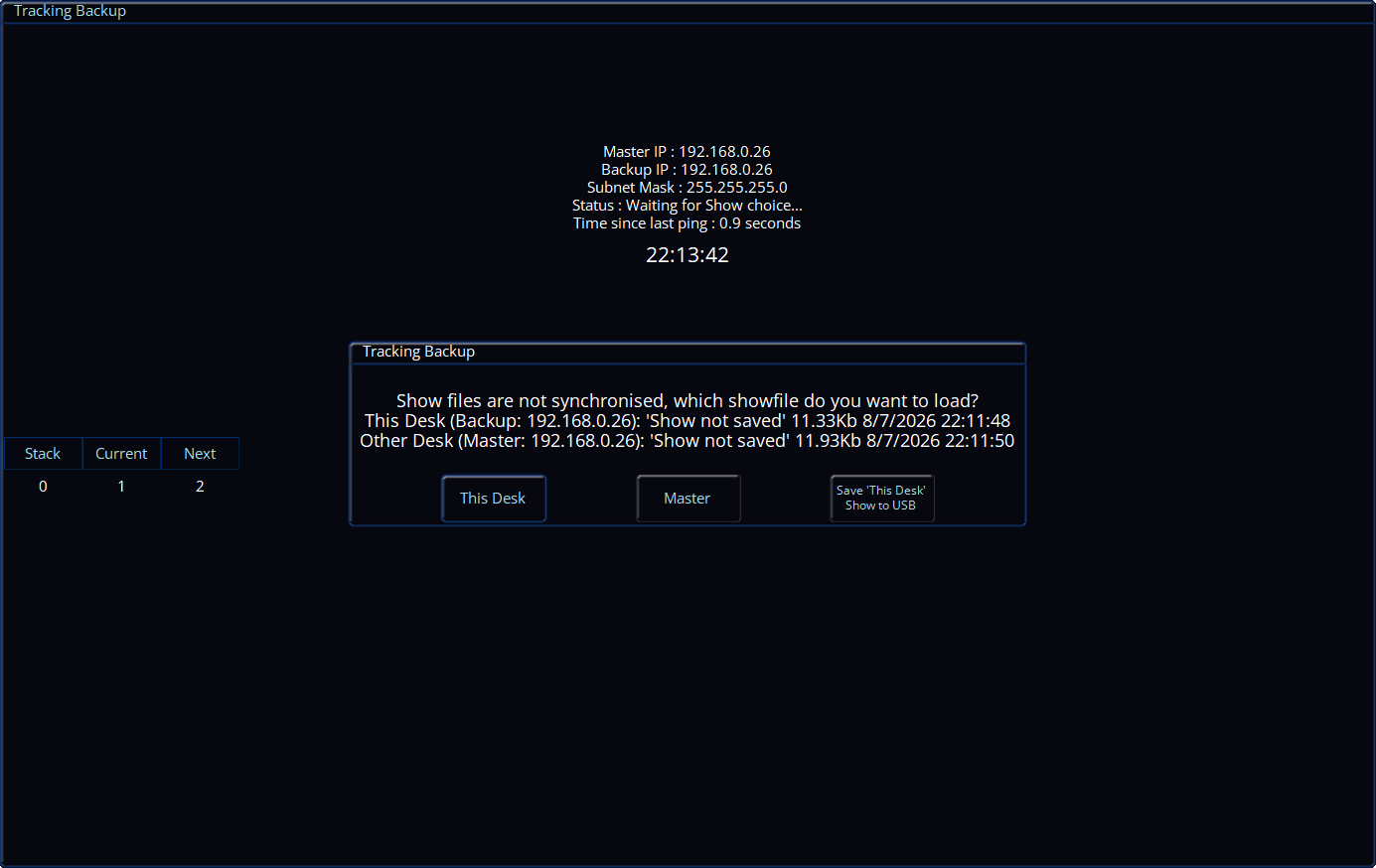
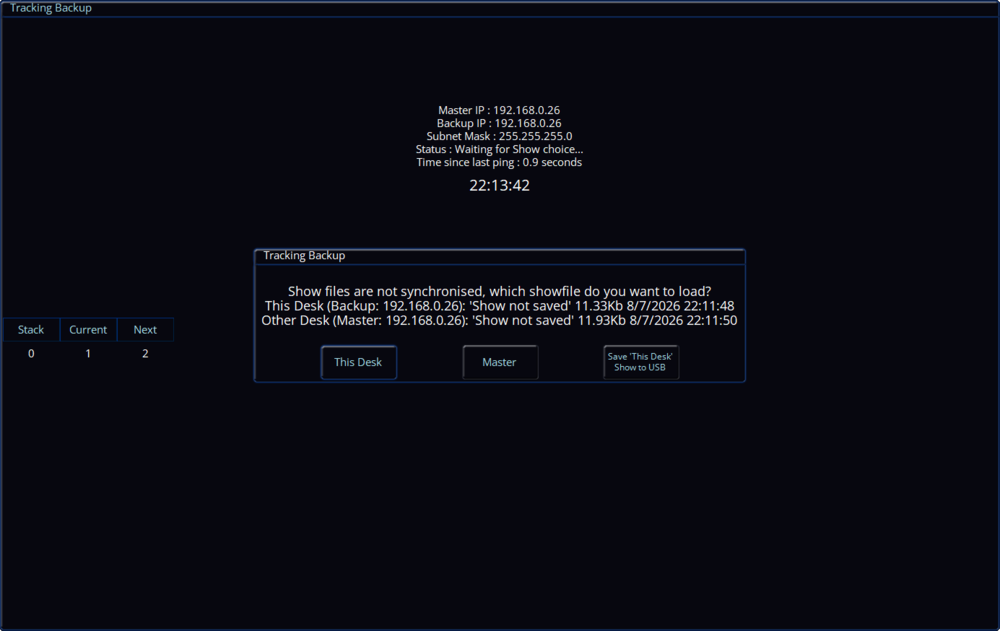
Hi @scottydog75, Tracking backup ensures that the master and backup desk(s) are synchronised - so when an update is made on the master desk (e.g. a cue is recorded, a playback is raised), it is automatically transferred to the backup desk without any prompts. Therefore, making edits to the showfile on the master desk shouldn't force the backup desk to take over. You'd get a prompt (as seen below) asking which show file you want to use when taking back control on the master desk if the backup desk has already taken over, along with the ability to save the current showfile on that desk to a USB storage device. At the time, were you using DHCP, or did you assign the desks static IP addresses? Perhaps something was conflicting with the master desk using static IPs, meaning the master desk couldn't acknowledge the backup desk to say 'Yes, I'm still here!', therefore the backup desk took over? Or, perhaps some packets were lost over the network and again, the backup desk couldn't pick up that the master desk was still alive...
-
Hi Martin, The only BIOS section which pops out to me regarding this issue is Advanced > Display Control. The settings are as follows: Display Mode: [CRT+LFP] Flat Panel Type: [XGA 1x18] Flat Panel Scaling: [Stretched] If those settings are already as listed, it may be a dodgy connection internally to the Monitor 2 VGA port causing a colour to not be output, giving you an image without the correct colours. If you're confident in opening the desk, it would be worth checking this. I hope this helps. Archie
-
Hi @Martin J, I'm fairly confident that Frog2 and Orb Series consoles have the same BIOS as each other, so when I'm home I'll make a list of all the BIOS settings for you. Failing that, some soldered connections on the VGA connector itself for monitor 2 may be faulty, therefore not giving all colours on the display output. The VGA port has individual pins for Red, Green and Blue colours, so one of those might be causing the issue you're experiencing. Archie
-
Gone are the days where beta testers would have had early visibility to assist with identifying wider usability observations...
-
Hi to all. I am hoping that one of you may be able to help with a list of the correct Bios settings for the Orb desk. Ours has sideview reset its Bios settings to default. Through lengthy trial and error, the desk has finally been made to work again and it now loads ZerOS as normal but I have been unable to make the Monitor 2 video output show the correct colours on the display. (It's not a display issue - I've tried swapping over). Monitor 1 video is fine. How is the Monitor 2 video generated? Many thanks for any words of wisdom! Best regards, Martin
-
Hi @O Thompson, You probably found that this was because SmartTag was enabled in the Record Options window. Recording home values worked fine, but default values did not because SmartTag ignores fixtures with zero intensity. Your home values had the fixtures at an intensity higher than zero, therefore they were included in the record operation. Another solution to not seeing your fixtures move when your playback is raised is by viewing the playback settings (SETUP + Playback Button) -> Button Function -> Go (Snap) -> OK. Now, you can tap the playback's button to prep your fixtures (position, beam, shape and colour) and then raise the fader to bring intensities up. If you wish to preserve the current setting for button function, you can instead change the shifted button function (what happens when you hold SHIFT and tap the playback's button). To do this, hold SHIFT while tapping the new button function. Now, hold SHIFT and tap the playback's button to prepare your fixtures. If you wish to use this method instead (it allows for multiple different positions of fixtures with lots of playbacks), you can restore your fixture's default values to their default values by selecting them and tapping DELETE -> Home -> Default. I hope this helps. Archie
-
Updated to 8.0.1 and used successfully without issue in three shows now.
-
Ah, well, while the manual reference provided by @kgallen gives you the structure of OSC messages you still have to choose which ones to use and that will depend on what the you think is the easiest to program. For your panto I would look at simply sending a "go" for the next cue in your show. This probably simplifies your sending system and you are not going to get away with not programming states whatever you do. For live music you may want to use a manual input to trigger specific cues or playbacks. I work in music venues and have a fairly sophisticated (new) TouchOSC interface to select colours, positions, gobos and effects quickly. These are all stored as cues in separate playbacks for each of colours, positions, etc. You could use the (free) original TouchOSC to do something similar. NB Neither of these solutions fit well with chases. While there is an OSC command to control a playback's level you are probably better off triggering a cue that, in turn, triggers a chase playback (like you would have to if you wanted a chase in a programmed show). Check out the OSC "release" message, you may need this to stop chases/effects when busking. Also, look at macros for setting bpm (for panto) and/or having a tap button (for music but, maybe, for panto).
-
Others will know better but over a network you’re probably looking at OSC https://www.zero88.com/manuals/zeros/setup/triggers/osc-examples Lots of post on this in the FLX and FLX S forums, have a look round.
-
 KevTheSoundGuy joined the community
 -
We've been looking into replacing our old Leapfrog (which has broken down 3 times in the last 2 years) with an S48 The lack of a simple way to synchronise sound and light is a serious shortcoming with the S24/S48. even the cheapest and nastiest desks have this facility. In a previous existence we used this desk https://www.thomann.co.uk/botex_dc2448_light_operator.htm (believe me the cheapness and nastiness shines through when you want to do something special with it There are two main uses for this facility Pantomime. There are frequent song & dance numbers where having the lights 'dance to the same tune' as the performers would enhance the show. Yes the music is usually pre-recorded so timed changes could be programmed but this is very time consuming during setup Our last pantomime had TWELVE song'/dance routines Live music shows/gigs. Here it's likely you'd want to program a number of chases and then choose which chase to use depending on the songs played. I'm building a box with an audio input that can provide multiple digital outputs (it was intended to connect to the leapfrog trigger inputs). It would be possible to have a wifi connection on the box Our setup uses an Ethernet connection to some Artnet to DMX receivers. My view is once the location has networking it's possible to connect anything we need to that network What I'm unsure about is the structure of any messages I would need to send to act as a trigger