Edward Z88
-
Posts
3,294 -
Joined
-
Last visited
-
Days Won
85
Everything posted by Edward Z88
-
Bonjour, Veuillez envoyer une copie de votre fichier show à support@zero88.com, accompagnée d'une description indiquant quels appareils sont utilisés dans quelles mémoires et par quels appareils vous souhaitez les remplacer. Nous allons ensuite jeter un œil pour voir ce qui peut se passer. Si vous avez des questions, s'il vous plaît laissez-nous savoir. Hello, Please could you email a copy of your show file to support@zero88.com, along with a description stating which fixtures are used in which cues, and which fixtures you wish to replace them with. We will then take a look to see what may be going on. If you have any questions, please let us know.
-

Operator for FLX in Birmingham July 2022 for three weeks
Edward Z88 replied to Alasdair's topic in FLX
Hi @Alasdair Welcome to the Zero 88 Forum. Thanks for reaching out to FLX S users on the forum. It might just be worth clarifying a couple of points: FLX S24 consoles do not have an external monitor output - do you mean a FLX S48 console? FLX S consoles cannot be triggered by SMPTE timecode. If you are looking for MIDI Timecode support, I would recommend using the FLX console... https://zero88.com/control/flx If you have any questions, please let us know. Edward -
Hi @Muller Light Welcome to the Zero 88 Forum. Thank you for sharing your thoughts. Solution consoles, and other legacy ZerOS consoles, use x86 architecture. FLX consoles use ARM architecture. Therefore the FLX branch is very different to the Solution branch, and you couldn't simply run the FLX software on a Solution. The FLX processor is also far more powerful than the Solution processor, and so there are FLX features not available on Solution consoles. If you have any questions, do let us know. Edward
-
Hi All, Next week, we have an online training session scheduled, covering the key new features in ZerOS 7.10 software. Click the link below to see the upcoming sessions and to register your place... https://zero88.com/training#eventdates Edward
-
Hi @Troncosauce The direct link to the ZerOS 7.10 download is available here... https://zero88.com/storage/downloads/0b68ecc6-9829-4000-b469-63b94a0c62c3/ZerOS-7.10.exe This software is available, along with Phantom ZerOS, the release notes, and ZerOS Monitor, from the ZerOS page here... https://zero88.com/zeros#download Please see the link below for installation instructions... https://zero88.com/manuals/zeros/setup/load/zeros-software I hope this helps, Edward
-
Hi @van den abbeele Eric That's great, sounds good. If there's anything else I can help with, please let me know. Edward
-
Thank you for linking to the fixture's manual. I have taken a look, and this appears to be working correctly. As this is not a linear fixture, the cells will not be selected by default upon raising the fixtures fader. Therefore when you raise the fader and apply an effect, it will run across the master intensity/master RGB, not the cells. To break the fixture down into its cells, raise the fixture's fader, and then tap Z/Shift, and type ". ENTER". Now when you apply an effect, it will run across the cells. To control an individual intensity, hold Z/Shift and tap the fixture's channel button. Each tap will select each cell in turn. Once you have selected the cell you want, you can use the intensity wheel to adjust the level of the cell. Hope this helps, Edward
-
Hi @hermionejay Any USB drive should work with FLX S consoles. The USB drives that used to come with Zero 88 consoles were in the FAT32 format. Edward
-
Hi Sven, Sorry to hear this. Would you be able to email us a copy of your show file to support@zero88.com? If so we will take a look, and see what may be causing it. If you are using a large number of multicell fixtures on your Orb/OrbXF console, you may start to see a lag whilst the console records all the cells into cues. If you have any questions, please let me know. Edward
-
To select individual cells, to allow you control the parameters related to an individual cell, hold Z/SHIFT, and tap the fixture's channel button. The Output Window will show you the currently selected cell. More information here... https://zero88.com/manuals/zeros/selection-and-intensity/channel-faders#multicell Universes are currently £250 ex-VAT. Please email support@zero88.com if you would like to upgrade, or would like more information Please let me know the fixture's make and model, and the mode you were using, and I'll take a look. Edward
-
Hi Henry, If you hover your cursor over a button, the button's function will be displayed at the top of the Front Panel window in the title bar. You will also be able to use some keyboard shortcuts to control Phantom ZerOS as well. Please see the link below for more information... https://zero88.com/manuals/zeros/shortcuts/keyboard-shortcuts#flxs Hope this helps, Edward
-
Yes it is. Art-Net and sACN functionality is the same across all ZerOS consoles. The only difference is the number of DMX channels you can output over Ethernet. No problem. To clarify, you will be able to configure the device remotely if you just use Art-Net. What you cannot do, unless the device supports Art-Net 4, is use sACN for DMX over Ethernet, and use Art-Net for the configuration over Ethernet. Hope this helps, Edward
-
Hi @HenryYandell Welcome to the Zero 88 Forum. There are currently no plans to bring this to Solution/Leapfrog consoles. Leapfrog and Solution consoles are combined on Phantom ZerOS, and so have the black background of the Solution consoles. Edward
-
Hi @van den abbeele Eric For an introduction to Art-Net and sACN connectivity on FLX, I’d recommend watching the training session below… For information on configuring sACN, please see the link below… https://zero88.com/manuals/zeros/setup/universes/streamingacn For information on IP addresses and subnets, including Class A, B & C, see the link below… https://zero88.com/manuals/zeros/networking/ip-addressing For information on configuring ZerOS Network Settings, see the link below… https://zero88.com/manuals/zeros/networking/zeros-network-settings This is an example way of configuring your FLX and Swisson gateway: Connect the devices together with a single Ethernet cable Enable sACN on FLX (SETUP -> Universes -> sACN -> Enabled), and set the IP address to 10.0.0.1, with a subnet of 255.0.0.0 Configure the Swisson to an IP address of 10.0.0.2, also with a subnet of 255.0.0.0. This may be called “Class A” on the Swisson. On the Swisson, you will be able to configure the DMX outputs to output sACN universe 3 and 4. You should be able to do this via the Swisson’s web server, by connecting the device to a PC via Ethernet. You will need to configure the PCs IP address to 10.0.0.3, with a subnet of 255.0.0.0. You will then be able to type “10.0.0.2” into the PC’s web browser. You may also be able to configure the Swisson’s sACN settings from FLX, if the Swisson supports Art-Net 4. See the link below for more information… https://zero88.com/manuals/zeros/setup/devices/art-net-devices By default, FLX will send desk universes 3 and 4 to sACN universes 3 and 4 respectively I hope this helps. If you have any questions, please let me know. Edward
-
Hi @van den abbeele Eric As @martin-144 mentions, there is currently no dedicated way of configuring a UDK to not be included when recording a cue. However, if you record cues with SmartTag disabled, only values that you manually adjust will be recorded, and values coming from cues and UDKs will be ignored. The other potential option, if you could Park channels 37 and 38. See the link below for more information… https://zero88.com/manuals/zeros/user-definable-keys/advanced-udks/parking Hope this helps, Edward
-
how this new Update 7.10 is going ? Well ?
Edward Z88 replied to van den abbeele Eric's topic in FLX
Hi David & Ed, Thanks for the feedback. Sorry to hear this. Glad to hear the update to 7.10 was pretty smooth for you. You’ll get used to the Beamshape split in time! As a general rule, any parameter that “cuts into” the beam of light is a Shape parameter. Lenses and other functions are Beam parameters. This issue was logged as reference number ZOS-8721, and as per the release notes, should be fixed in ZerOS 7.10. Selecting a fixture, should now take you to the first parameter page for an attribute. If this isn’t the case, let me know which fixtures you are having difficulty with, and I’ll take a look. Edward -
Using a playback as a referenced submaster.
Edward Z88 replied to STPartington's topic in FLX S24 & FLX S48
Hi Stevie, No problem at all - makes sense. If there’s anything else we can help with, just let us know. Edward -
No option for Turn into Chase when programming cues
Edward Z88 replied to Klaas's topic in Solution & Solution XL
Hi Klaas, By "chase's button", I mean the physical button below the playback that has a chase recorded onto it. In ZerOS 7.9 and later, the ability to record multiple steps into a single cue was removed. Instead, you can now record multiple cues onto the "submaster" faders. If you haven't seen it already, I'd recommend watching the video below... Very sorry to hear this. Thank you very much for attaching the debug file from your console. We are currently aware of a potential crash on Solution consoles running ZerOS 7.10, related to viewing the Fixture Levels window. Our software team are currently investigating this. I have shared your debug file with them, to aid in their investigations. If you wish to roll back your console's software to ZerOS 7.9.9, which is the previous software version, this can be downloaded from the link below... https://zero88.com/storage/downloads/607844fa-0fdf-401a-9e42-29c8fac4e7bf/ZerOS-7.9.9.5.zip Installation instructions are available here... https://zero88.com/manuals/print?manual=zeros&type=section&content=zeros-software Would you be able to email me a copy of your current show file to support@zero88.com? If so, please provide a description of which cues and fixtures seem to be causing you problems, and we will investigate. If you have any questions, please let us know. Edward -
No option for Turn into Chase when programming cues
Edward Z88 replied to Klaas's topic in Solution & Solution XL
Hi @Klaas Welcome to the Zero 88 Forum. You should receive the following pop-up, when recording onto a playback which already has a single cue stored on it... If you are seeing something different, would you be able to take a picture of this and share it with me? Would you also be able confirm your current software version? To do this, hold the SHIFT button, and tap your chase's button, to manually step through each cue of the chase. Hope this helps, Edward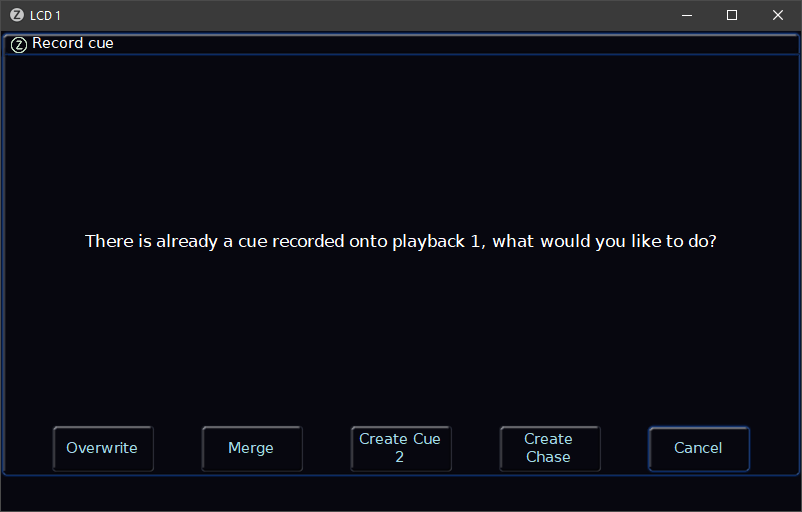
-
Using a playback as a referenced submaster.
Edward Z88 replied to STPartington's topic in FLX S24 & FLX S48
Hi Stevie, I'm keeping well thanks. Sounds great! Essex sounds rather close to the sea and London for ballooning! Good question. No it won't. Move On Dark only reads ahead to data stored in cues further down the cue stack. However if you needed a workaround, let's say that in cue 11 you need to trigger playback 1. Let's say that cue 10 does not use the lights in playback 1. In cue 10, you could trigger a cue "0.5" for example in playback 1, which is an empty cue, however can prepare your lights for cue 1. Cue 11, could then trigger cue 1 in playback 1, and you will simply see intensity raised, as cue "0.5" would have already run and prepared the colour, beam, shape and position. Hope this helps, Edward -
Hi Eric, Thanks for voting for your top topics. You can already copy multiple cues to a new location. Please click the link below for more information... https://zero88.com/manuals/zeros/cues-playbacks/copying Hope this helps, Edward (I have deleted your unnecessary posts)
-
Using a playback as a referenced submaster.
Edward Z88 replied to STPartington's topic in FLX S24 & FLX S48
Hi Stevie, Good to hear from you! How are you? You could do this by simply triggering the playback from a cue in the Master Playback each time you need it. Your cues in the master playback therefore wouldn't "reference" the playback, they would just tell it to be triggered. For example, let's say you have a single cue programmed on playback 1, that you wish to use regularly throughout the show on your Master Playback. Whenever you wish to do this, you will be able to program an almost empty cue on the Master Playback. You can then go into the cue's settings, and configure it to trigger playback 1. The next cue would then need to be configured to release playback 1. The reason I say that the cue that triggers playback 1 needs to be almost empty, is because if it is completely blank, with no intensity information at all, fade times will not be available for the cue. However, you will need these to govern the fade in time of the playback that's being triggered. You may therefore want to just add a fixture in at 1%, to ensure you have some information in it, to allow you to configure fade times. For information on triggering and releasing playbacks from a cue, please see the link below... https://zero88.com/manuals/zeros/cues-playbacks/cue-settings/cue-macros I hope this helps. If you have any questions let us know. Edward -
Hi @hermionejay Welcome to the Zero 88 Forum. As per @Ed75's suggestion, have you tried plugging your USB drive into a Windows PC? If so, can you see the USB drive in File Explorer? Edward
-
Salut Romrom, Pas de problème, heureux d'apprendre que vous avez pu mettre à jour vos repères. Hi Romrom, No problem, glad to hear you were able to update your cues. Edward
-
Hi Sven, Thank you for the suggestion. This would also benefit Phantom ZerOS users that do not have a touchscreen laptop. I have logged this on the system as reference number ZOS-10879. Many thanks, Edward